Supertrend, by ParagonSignalsThis indicator implements a trend-following overlay with flow-conditioned preprocessing, regime conditioning, and explicit signal lifecycle governance.
Input engineering (flow-conditioned baseline):It replaces raw price with an engineered baseline designed to capture effective directionality modulated by relative participation.
The internal signal is kept robust and stable via robust scaling, outlier clipping, and a finite-memory integrator to mitigate structural drift.
Trend engine (SuperTrend on engineered series): It computes SuperTrend on the engineered baseline, shifting the trend logic from pure price to a more stable representation of directional pressure and reducing sensitivity to single-bar noise.
Regime conditioning: It estimates a continuous tradeability index (0–1) combining directional efficiency, relative volatility expansion, and return-sign stability.
This index governs the system’s aggressiveness.
Signal governance (stateful execution proxy): It maintains a discrete LONG/SHORT/FLAT state with dynamic TTL, cooldown, persistence-gated flips, and degradation-based exits—enforcing hysteresis and exposure control in adverse regimes.
Relative to a classic SuperTrend (fixed parameters and binary logic), this design adds context awareness, signal quality gating, and lifecycle management, with the intent of reducing whipsaw and formalizing entry/exit behavior under uncertainty.
Hope you enjoy this SuperTrend—consider it a free, research-oriented release.
The methodology reflects professional quant practice—robust preprocessing, regime conditioning, and signal governance—features typically reserved for paid toolkits.
Research-grade release, provided as-is: no edge promised, no warranty, no liability — validate statistically and manage risk accordingly.
Disclaimer: This indicator is for educational and informational purposes only. It is not financial advice, investment advice, or a recommendation to buy, sell, or trade any asset. Trading involves risk and you may lose part or all of your capital. You are solely responsible for your decisions.
חפש סקריפטים עבור "binary"

Precision Structure Pro [BOSWaves]Precision Structure Pro - Multi-Tier Market Structure Execution with HTF Trend Alignment
Overview
Precision Structure Pro is a market analysis system designed to provide traders with structural understanding of price action. The system operates on the principle that markets follow observable patterns that can be systematically identified and interpreted. Precision Structure Pro combines adaptive indicators, dynamic visualizations, and customizable alerts to support both trend-following and contrarian strategies. Each feature translates technical concepts into actionable, on-chart insights, allowing traders to make informed decisions without information overload. The system emphasizes clarity, precision, and adaptability, enabling users to interpret market behavior in real time with risk-aware, disciplined trading practices.
Structural Analysis Engine
At the core of Precision Structure Pro lies the Structural Analysis Engine, a sophisticated framework designed to detect meaningful shifts in market structure with minimal lag and maximum reliability. Traditional swing-based systems merely connect price highs and lows, often generating false signals during periods of noise or minor retracement. Precision Structure Pro's engine goes deeper, analyzing market momentum, volatility, and price clusters to distinguish between genuine structural breaks and minor fluctuations.
The engine employs a configurable lookback period ranging from 5 to 50 bars, allowing traders to calibrate sensitivity based on their preferred timeframe and trading style. Shorter periods produce more frequent signals suitable for scalping and intraday trading, while longer periods generate fewer but more significant structural markers ideal for swing and position trading. This adaptability ensures the system remains relevant across all trading methodologies.
Break of Structure (BOS) Detection
Break of Structure (BOS) signals are provided whenever price decisively moves beyond a previous swing high or low, highlighting potential continuation setups. The system offers two confirmation methodologies: body-based confirmation, which requires candle closes beyond structural levels for conservative validation, and wick-based confirmation, which triggers on price touches for more aggressive entry opportunities. This dual-option approach allows traders to align the tool's sensitivity with their risk tolerance and market conditions.
Use Case 1: Trend Continuation Trading
A trader identifies a pullback within an established uptrend. The dashboard confirms higher timeframe alignment remains bullish despite the short-term retracement. When price breaks back above the pullback structure, the system generates a BOS signal and activates the trade dashboard with entry, stop-loss, and three profit targets. As targets are hit sequentially, the trader takes partial profits while trailing the remainder, combining systematic risk management with the flexibility to capture extended moves.
Change of Character (CHoCH) Recognition
Change of Character (CHoCH) alerts indicate early reversal opportunities, marking the transition from trending to counter-trend behavior before it becomes evident to the naked eye. CHoCH signals emerge when price breaks a structural level counter to the established trend direction, providing advance warning of potential trend exhaustion or reversal. These signals are particularly valuable for identifying market turning points that precede traditional reversal indicators, offering traders strategic positioning advantages for both exits and counter-trend entries.
By combining BOS and CHoCH signals, traders can identify both continuation and reversal scenarios, enabling them to adapt strategies to shifting market conditions without relying solely on lagging indicators. The engine maintains a persistent memory of structural levels, tracking which pivots remain relevant and which have been invalidated by price action, ensuring that only significant structural events generate signals while noise is systematically filtered.
Use Case 2: Counter-Trend Reversal Trading
During an established trend, price breaks structure in the opposite direction, triggering a CHoCH signal. The candles begin changing color to reflect the structural shift. However, the dashboard shows the higher timeframe remains in the original trend direction, alerting the trader to timeframe conflict. This prompts tighter profit management focused on early targets rather than extended holds, as the setup represents a counter-trend opportunity requiring tactical rather than strategic positioning.
Multi-Timeframe Integration
Multi-timeframe integration within the Structural Analysis Engine provides an additional layer of context that dramatically enhances signal reliability. For instance, a BOS signal on a lower timeframe gains significantly more weight when aligned with the trend observed on a higher timeframe. This hierarchical approach allows traders to confirm signals against broader market trends, reducing exposure to false breakouts and enhancing confidence in entries and exits.
The system continuously monitors a user-selected higher timeframe - configurable to any interval from minutes to weekly charts - and compares its structural trend against current timeframe signals. When lower timeframe BOS or CHoCH events align with higher timeframe directional bias, the system validates these as premium opportunities. The on-chart dashboard displays real-time higher timeframe trend status, showing whether the broader context is bullish, bearish, or neutral, providing traders with instant situational awareness without requiring manual chart switching.
Hierarchical Confirmation and Filtering
Traders can enable higher timeframe alignment requirements, which filters out signals that conflict with the dominant trend on larger timeframes. This filtering mechanism significantly reduces false signals during counter-trend noise while preserving high-probability setups that ride institutional momentum. The result is a trading system that respects market hierarchy, acknowledging that larger timeframe structures exert gravitational influence on smaller timeframe movements, and positioning traders on the right side of dominant flows.
The engine is designed to be highly adaptive, factoring in price volatility and recent momentum to filter out noise while emphasizing meaningful structural changes. The result is a system that not only identifies key market turning points but does so in a way that is sensitive to context, volatility, and timeframe alignment, creating a comprehensive structural narrative that evolves with market conditions.
Volatility-Adaptive Stop-Loss Calculation
Managing risk is as important as identifying opportunities, and Precision Structure Pro addresses this through its Volatility-Adaptive Trade Management system. Unlike static stop-loss levels that fail to account for changing market conditions, this system calculates dynamic stop-loss points based on volatility measurements and market structure. The system employs an analysis window that captures current market movement characteristics and serves as the foundation for all risk calculations.
The system employs a multi-layered calculation methodology. First, it establishes a base distance by applying a user-configurable volatility multiplier (0.5 - 5.0x, default 2.0x) to the measured market volatility. This base distance is then scaled by a stop-loss multiplier (0.1-5.0R, default 1.2R) to determine final stop placement. In high-volatility environments - such as during major news events or market opens - stops are adjusted wider to avoid premature exits from normal price oscillation, while in calm, low-volatility periods, stops tighten to prevent unnecessary exposure and improve capital efficiency.
Tiered Take-Profit System
Take-profit levels are tiered into three distinct targets, each calculated as a ratio of the stop-loss distance. The first target typically sits at 0.8R (80% of the risk distance), providing a conservative profit-taking opportunity that's frequently achieved. The second target extends to 1.6R, capturing intermediate moves while maintaining realistic probability. The third target reaches for 2.8R or beyond, designed to capture extended trend moves and maximize profit potential when momentum continues. These ratios are fully customizable, allowing traders to adapt the system to their profit-taking preferences and market characteristics.
This tiered approach enables traders to lock in profits progressively, reducing psychological pressure while allowing portions of positions to capture larger moves. Traders can take partial profits at early targets and move stops to breakeven to create risk-free positions, while letting remaining size run toward final targets or trailing stops. This partial exit strategy dramatically improves trading psychology by removing the binary pressure of all-or-nothing exits, while maintaining exposure to extended moves that generate outsized returns.
Visual Trade Mapping
Visual representations of dynamic levels are overlaid on the chart with sophisticated rendering techniques. Each level features a multi-layer glow effect - a translucent outer layer for ambient visibility, a semi-transparent middle layer for depth, and a solid core line marking precise price levels. Entry levels appear in bright white, stop-loss zones in vibrant red with danger shading, and take-profit levels in neon green with success-themed styling. Risk and reward zones are represented by translucent boxes that span from entry to stop (risk) and entry to final target (reward), providing immediate visual assessment of trade quality without manual calculation.
Dynamic Status Labels
Labels accompany each level, displaying precise price values and status indicators. Take-profit labels show "PENDING" status until price reaches them, at which point they dynamically update to "HIT" with altered styling to celebrate achievement. Stop-loss labels remain prominent throughout the trade, maintaining awareness of maximum risk. This comprehensive visual mapping ensures traders understand trade structure at a glance, facilitating faster decision-making and reducing cognitive load during active trading sessions.
Intelligent Position Sizing Calculator
Position sizing translates risk percentage into actual trade size. Precision Structure Pro includes a position sizing calculator that performs this computation automatically, eliminating manual calculation errors that can lead to over-leverage or inefficient capital utilization.
The calculator employs a standardized formula that works across all asset classes: Position Size equals Account Size multiplied by Risk Percentage, divided by Stop Distance. This calculation automatically accounts for varying instrument characteristics - whether trading cryptocurrencies with multiple decimal places, forex pairs with pip-based measurements, stocks with dollar-based stops, or futures with point-based movements.
Position Sizing Configuration
Traders configure two key parameters: total account size (their available trading capital) and risk percentage per trade (typically 1-2% for conservative risk management). When a trade signal generates, the system instantly calculates the exact number of units, shares, contracts, or coins to trade based on the automatically-determined stop distance. This calculation appears directly in the on-chart dashboard, displaying both the dollar amount at risk and the precise position size.
This functionality ensures consistent risk across all trades - whether stop distance is narrow or wide, position size adjusts to maintain identical dollar risk. It eliminates execution delays caused by manual calculation and prevents common position sizing errors that plague discretionary traders. The position sizing display can be toggled on or off based on user preference.
On-Chart Dashboard Overview
Information overload impairs decision-making, particularly during fast-moving market conditions. Precision Structure Pro's on-chart dashboard consolidates critical market information into a single, scannable interface that provides situational awareness without requiring navigation between multiple indicators or charts.
The dashboard features a hierarchical information architecture designed for rapid comprehension. At the top, a bold status header announces trade state - LONG ACTIVE or SHORT ACTIVE - with color-coded backgrounds matching trade direction. This visual confirmation prevents confusion about current exposure, particularly when managing multiple positions across different instruments.
Dashboard Components
The higher timeframe status section displays the broader market context, showing whether the selected higher timeframe is BULLISH, BEARISH, or NEUTRAL with corresponding color coding. This provides instant confirmation that current trade direction aligns with dominant market structure, or warns when taking counter-trend positions that require tighter management.
The core metrics section presents trade fundamentals in clean, organized rows: direction confirmation, precise entry price, stop-loss level with distance percentage, and three take-profit targets each showing status (PENDING or HIT), price level, and percentage gain from entry. Visual separators organize these sections, creating clear information boundaries that facilitate quick scanning during time-sensitive decisions.
When position sizing display is enabled, the bottom section shows calculated risk amount in dollars and exact position size in trading units. This eliminates the cognitive step of mental calculation, allowing traders to execute positions immediately with confidence in their risk management.
Dashboard Customization
The dashboard supports four positioning options - top-right, top-left, bottom-right, or bottom-left - allowing traders to anchor it in their preferred location based on personal workflow and chart layout. Importantly, the dashboard only appears when an active trade exists, preventing chart clutter during pure analysis phases when no positions are held. This adaptive visibility ensures the interface remains clean and focused, presenting information only when relevant.
Dynamic Candle Coloring
Technical precision means little if the information isn't immediately digestible. Precision Structure Pro employs sophisticated visualization techniques to transform complex structural data into intuitive visual language that communicates market state at a glance.
The system implements dynamic candle coloring that reflects current structural trend. When market structure is bullish - characterized by BOS signals breaking upward - candles render in cyan tones, creating a visual flow that reinforces upward momentum. When structure turns bearish, candles shift to magenta, immediately communicating downward pressure. During transitional or consolidative periods when structure is unclear, candles display in neutral gray, signaling caution and the absence of clear directional bias. This color-coded system allows traders to interpret market character without analyzing individual price bars, dramatically accelerating pattern recognition.
Structural Level Visualization
Structural break events are marked with multi-layered horizontal lines that employ sophisticated rendering techniques. Each structural level features three layers: a wide, highly transparent outer glow creating ambient visibility, a medium-width semi-transparent middle layer adding dimensional depth, and a solid, precise core line marking the exact price level. This gradient effect makes critical levels stand out prominently even on cluttered charts, while maintaining visual elegance and professional aesthetics.
Professional Label System
Labels accompany each structural event with clean, professional text. BOS events are marked simply as "BOS," while CHoCH events receive distinctive "CHoCH" labeling. These labels are positioned intelligently using volatility-based offsets - appearing above price highs for bearish breaks and below price lows for bullish breaks - ensuring they float in whitespace rather than obscuring candles or overlapping with price action. The system limits the number of simultaneously visible labels (configurable from 1 - 10, default 3) to prevent chart clutter, automatically removing the oldest labels as new signals emerge.
Signal Alerts
Real-time monitoring of multiple charts across various timeframes is impractical for discretionary traders. Precision Structure Pro's alert system helps traders track critical market events, even when away from their trading stations.
The system provides distinct alerts for each signal type. Bullish and bearish Break of Structure alerts fire when upward or downward BOS events occur, with alert messages including current entry price and ticker symbol for context. Bullish and bearish Change of Character alerts notify traders of potential reversals, providing warning to either exit existing positions or prepare counter-trend entries. A generic "New Trade Signal" alert triggers on any valid BOS or CHoCH event, useful for traders monitoring multiple instruments simultaneously.
Trade Management Alerts
Trade management alerts operate independently from signal alerts. Take Profit 1, 2, and 3 alerts fire when price reaches each respective target level, prompting traders to execute their planned partial exit strategy. The Stop Loss Hit alert provides critical notification when trades fail, enabling rapid response to adverse movements and preventing extended drawdowns from unmonitored positions.
The system incorporates intelligent alert tracking to prevent notification spam. Each alert type fires once per event - when a profit target is hit, for example, the system sends a single notification rather than repeatedly alerting as price fluctuates around the level. Alert states reset when new trade signals generate, ensuring fresh monitoring for each position.
Alert Delivery
Alerts route through TradingView's native alert infrastructure, providing multiple delivery options. Traders can receive pop-up notifications during active monitoring, email alerts for remote tracking, mobile push notifications through the TradingView app. This provides flexibility for traders to remain connected to market developments regardless of their physical location or monitoring capabilities.
Design Philosophy
Precision Structure Pro emphasizes clarity, adaptability, and risk-aware execution. Every feature - from structural analysis to dynamic visualizations and customizable alerts - is intended to provide insight, not guarantees. Markets are inherently uncertain, and no indicator can predict future price movements with certainty. Rather than promoting false confidence, the toolkit is designed to enhance situational awareness, improve pattern recognition, and streamline execution of sound trading strategies.
Traders are encouraged to integrate toolkit outputs with personal judgment, broader market context, and sound risk management principles. The system excels at identifying structural patterns and managing trade logistics, but ultimate decision authority rests with the trader. This approach fosters a disciplined, systematic mindset that prioritizes high-probability setups, multi-timeframe confluence, and methodical execution over reactive, emotion-driven trading.
Trading Psychology Benefits
The progressive profit-taking system embedded in the tiered take-profit structure addresses a critical psychological challenge: the tension between capturing large moves and avoiding profit give-backs. By systematically reducing position size at early targets while maintaining exposure to extended moves, traders experience regular positive reinforcement that reduces emotional stress and prevents premature exits. This psychological framework promotes patience and discipline, allowing traders to let winners run without the paralyzing fear of watching profits disappear.
Similarly, the volatility-adaptive stop-loss system prevents two common psychological traps: using stops that are too tight (leading to death by a thousand cuts from repeated small losses) and using stops that are too wide (resulting in catastrophic losses that damage both capital and confidence). By anchoring stop distance to current volatility, the system ensures stops are neither arbitrary nor divorced from market reality, promoting acceptance of losses as normal cost of business rather than personal failures.
Final Notes
Precision Structure Pro provides a layered, multi-dimensional perspective of the market, helping traders interpret price action with confidence, refine strategies, and improve trade quality over time. Its combination of adaptive signals, visual clarity, and comprehensive dashboarding creates a system that is both functional and intuitive, enabling both novice and experienced traders to operate efficiently in complex markets. The system supports trader judgment by providing the structural foundation upon which trading decisions are built.
Practical Use & Context
Precision Structure Pro performs best in markets exhibiting clear structural formation with meaningful momentum shifts at key levels. In highly compressed or low-liquidity environments where price drifts without conviction, structural signals may be sparse or unreliable. During extended consolidation with minimal directional variance, the system may generate fewer actionable signals as formation events fail to meet validation thresholds.
The system identifies structural breaks and generates complete trade setups including entry levels, stop-loss placement, and tiered profit targets. For optimal results, traders may choose to combine these signals with additional confirmation tools or filters based on their individual trading methodology and risk tolerance.
Risk Disclaimer
Precision Structure Pro is designed for educational and informational purposes only. Past performance does not guarantee future results. Trading involves substantial risk of loss and is not suitable for all investors. Traders should employ proper risk management, never risk more than they can afford to lose, and consider all outputs as advisory information requiring independent verification. All trading decisions should be made with full awareness of market uncertainty and personal risk tolerance. No indicator or system can guarantee profitable trades, and users accept full responsibility for their trading outcomes.

CVD Oscillator ToolkitGENERAL OVERVIEW:
The CVD Oscillator Toolkit is a volume-driven market analysis indicator designed to highlight buying and selling pressure that is not directly visible through price alone. Price shows where the market traded, but volume imbalance helps explain who was in control. This indicator is built around Cumulative Volume Delta (CVD) and its related measurements to separate aggressive buying from aggressive selling, highlight volume behavior that develops independently of price movement, and expose divergence between price action and underlying volume imbalance behavior. Signals are derived from normalized and smoothed volume data rather than simple price-based conditions.
Unlike raw CVD plots, which often drift endlessly and become difficult to interpret across different symbols or sessions, the CVD Oscillator Toolkit normalizes and structures volume data into a stable oscillator format. This allows volume behavior to remain readable and comparable across different market conditions and instruments, without being distorted by session length or cumulative drift.
This indicator was developed by Flux Charts in collaboration with Chris Drysdale (Trader Drysdale), author of the best-selling book VWAP Wave System.
WHAT IS THE THEORY BEHIND THIS INDICATOR?:
The indicator is built on the idea price movement is driven by imbalance, not by candles alone. Every candle represents an interaction between buyers and sellers. While the direction of the candle shows which side gained ground, volume reveals the intensity of that effort.
The CVD Oscillator Toolkit reconstructs this interaction by estimating buying and selling pressure on each bar, accumulating that imbalance over time, and then normalizing the result so volume behavior can be compared meaningfully across different symbols, sessions, and timeframes. This volume behavior is further structured into directional, momentum, and divergence components, allowing buying and selling pressure to be analyzed from multiple perspectives.
Rather than treating volume as a secondary confirmation, the toolkit treats volume delta as the primary source of information, with price acting as a contextual reference. This approach is particularly useful in market conditions where price alone can be misleading. For example, during consolidations where volume pressure may be building beneath the surface, during extensions where price continues to make new highs or lows while buying or selling pressure weakens, or during breakouts that lack sustained volume support.
In many cases, shifts in buying and selling pressure can become visible through volume behavior before the price structure visibly updates. The indicator is designed to surface those changes without attempting to predict outcomes, allowing traders to interpret volume dynamics alongside their own price-based analysis.
CVD OSCILLATOR TOOLKIT FEATURES:
The CVD Oscillator Toolkit indicator includes 10 main features:
Delta Volume & CVD Core Engine
Normalized CVD Oscillator with Adaptive Coloring
CVD Cloud, Edges, Highlight Candles & Bands
Signals
CVD Divergence
Flow Behavior
Rate of Change (ROC) Momentum Meter
Advanced Visualization & Theme System
Input Settings
Alerts
DELTA VOLUME & CVD CORE ENGINE:
This feature forms the foundation of the entire indicator.
🔹Cumulative Volume Delta (CVD):
CVD is a measure of net buying and selling volume over time. It is built by estimating whether each candle’s traded volume was driven primarily by buyers or sellers, and then accumulating that imbalance across consecutive bars. When buy-dominant volume exceeds sell-dominant volume, CVD rises. When sell-dominant volume exceeds buy-dominant volume, CVD falls. Because TradingView does not provide true bid/ask volume data, the indicator infers participation (buyer vs seller activity) using price behavior within each bar. Each candle is evaluated to determine directional intent. Bars that close higher than they open, or otherwise show upward intent, are treated as buy-dominant, while bars that close lower, or show downward intent, are treated as sell-dominant. The candle's volume is then assigned a positive value when buy pressure dominates and a negative value when sell pressure dominates. By accumulating this signed volume, the engine produces a continuous measure of who is applying pressure, independent of candle size or price range. This allows delta volume strength to be analyzed separately from price movement itself. Throughout this indicator, “volume pressure” refers to the net effect of delta volume over time.
🔹How to interpret CVD
When CVD is rising, buying pressure is more aggressive than selling pressure. When CVD is falling, sellers are exerting greater control. Flat or sideways CVD behavior indicates balanced or uncertain buyer vs seller activity, where neither side is clearly dominant. One of the most important insights provided by CVD is its relationship to price. Price can continue rising even while CVD declines, suggesting weakening buying pressure and potential distribution. Conversely, price can fall while CVD rises, indicating absorption (where selling pressure is being met by opposing buy orders, limiting downside progress despite continued activity). These situations often reveal information that price alone does not clearly communicate. For this reason, CVD is especially useful during consolidations, false breakouts, liquidity sweeps, and late-stage trend conditions, where price action may appear convincing while delta volume tells a different story.
🔹Long-term vs short-term Volume calculation modes
The indicator supports two volume perspectives. In long-term accumulation mode, delta volume is accumulated continuously, providing a broader view of sustained buyer and seller control across sessions or trends. In short-term rolling window mode, delta volume is summed over a fixed rolling window to emphasize local momentum and short-term shifts in buying and selling pressure. Together, these modes allow the same core engine to be used for higher-timeframe bias analysis as well as intraday momentum and reversal observation, without changing the underlying logic.
🔹How is it calculated?
Each candle's volume is first evaluated based on price behavior to determine whether it is buy-weighted or sell-weighted. That signed volume is then processed in one of two ways, depending on the selected volume calculation mode. In long-term mode, delta volume is accumulated continuously to reflect a broader market pressure over time. In short-term mode, delta volume is summed over a rolling window to emphasize local momentum and shorter-horizon shifts. The resulting series forms the raw CVD, which is then used for normalization, smoothing, and signal generation. All calculations rely only on confirmed historical bars, ensuring consistency and non-repainting behavior.
🔹Delta Volume Histogram
In addition to the cumulative CVD calculation, the indicator includes an optional Delta Volume Histogram that displays raw buy/sell imbalance on a per-bar basis. This view highlights short-term volume bursts that may not be immediately reflected in cumulative behavior, such as sudden spikes in buying or selling pressure, absorption events, or volume surges that fail to produce meaningful price movement. Because raw delta volume can be noisy and highly sensitive to short-term fluctuations, the histogram is visually muted by default.
NORMALIZED CVD OSCILLATOR:
🔹What is normalization?
Normalization is the process of rescaling data so it can be interpreted consistently over time. In this indicator, normalization transforms accumulated volume delta into a stable oscillator that remains readable across different sessions, symbols, and market conditions.
🔹CVD normalization modes (Adaptive vs Relative)
The accumulated delta is normalized to create a stable, interpretable oscillator. This process reshapes volume pressure so it can be compared consistently over time, without changing how delta volume itself is calculated. In Adaptive mode, normalization responds to recent behavior, allowing the oscillator to self-scale as volatility and market conditions change. This keeps the reading responsive and readable across shifting environments. In Relative mode, normalization compares current CVD against a fixed historical reference, preserving proportional relationships in volume behavior and making extremes easier to compare over longer structural moves.
Normalization affects how CVD is interpreted and visualized, not how delta volume is calculated. In both modes, the same underlying volume logic is used; only the framing and scaling of that data changes.
The CVD Oscillator Toolkit presents normalized volume behavior as a bounded oscillator that preserves directional intent while preventing cumulative drift. Rather than emphasizing the absolute size of volume imbalance, the oscillator focuses on where current buying and selling pressure stands relative to recent behavior. This structure keeps volume pressure interpretable across different market conditions, allowing the oscillator to remain comparable across assets and timeframes.
🔹How to interpret the normalized CVD Oscillator
The oscillator revolves around a central equilibrium level, represented by the zero line. When the oscillator is above zero, net buying pressure dominates. When it is below zero, net selling pressure dominates. Transitions across the zero line indicate a shift in volume control rather than a price-based event. The depth of the oscillator's movement provides additional context. Shallow oscillations reflect weak or hesitant order-flow pressure, while deeper extensions suggest stronger conviction from one side of the market. Periods where the oscillator compresses near the zero line often indicate balance, absorption, or indecision between buyers and sellers. Because the oscillator is smoothed, it emphasizes sustained volume behavior rather than reacting to single-bar fluctuations or short-lived volume spikes.
🔹How is it calculated?
Raw Cumulative Volume Delta is first evaluated over a configurable lookback window to establish recent volume pressure behavior. A momentum-based normalization process is then applied to compress extreme values, preventing the oscillator from drifting or becoming distorted during high-volume periods. To further refine the signal, multiple smoothing passes are used to reduce noise while still preserving meaningful directional turns. The result is a stable oscillator centered around zero, designed to behave consistently across different symbols, sessions, and timeframes. This structure avoids infinite drift, minimizes session bias, and allows volume pressure dynamics to remain comparable across instruments without relying on fixed thresholds.
🔹Adaptive Coloring & Directional Gradients
The oscillator is not plotted as a static line or a simple histogram. Instead, it uses adaptive coloring to communicate both direction and intensity of volume pressure through visual cues. Rather than relying on binary green/red coloring, the indicator applies smooth gradient transitions, strength-weighted opacity, and direction-aware color logic to reflect how volume pressure evolves. This visual design allows changes in volume behavior, such as acceleration, deceleration, or momentum fatigue, to be identified quickly without requiring precise numerical interpretation. Color intensity increases as pressure strengthens and fades as pressure weakens, helping maintain situational awareness even during fast-moving conditions.
🔹How to interpret the coloring
The oscillator uses momentum-based coloring to reflect changes in volume pressure strength and direction. Colors respond to acceleration and deceleration in volume pressure rather than simple position alone. Brighter, more saturated colors indicate stronger momentum and expanding buying or selling pressure, while muted or fading colors reflect slowing momentum and weakening pressure. The coloring does not generate signals and should be read as visual context that complements the oscillator’s structure, helping identify momentum shifts, continuation, and exhaustion at a glance.
CVD EDGES, CLOUDS & HIGHLIGHT CANDLES:
🔹CVD Edges
This feature adds a thin directional outline around the oscillator body, designed to emphasize the current directional volume bias without overpowering the main visual structure. The edge acts as a subtle visual guide, reinforcing directional dominance while keeping the focus on the oscillator itself. By separating the outline from the oscillator's fill or columns, CVD Edges make directional bias easier to identify at a glance, particularly in situations where histogram columns overlap or visual density increases. This feature is intended to enhance readability and orientation, not to introduce additional signals or conditions.
🔹CVD Clouds
CVD Clouds add a soft envelope above and below the oscillator to provide visual context around volume behavior. These clouds represent upper and lower volume pressure zones derived from the oscillator, helping frame how volume pressure expands or contracts around the core signal. When the cloud expands, it reflects increasing volume commitment and stronger involvement from one side of the market. When the cloud compresses, it indicates diminishing conviction and reduced pressure intensity. A flip in the cloud structure reflects a change in volume control rather than a price-based event. CVD Clouds are designed to provide context, not signals. They help answer a simple but important question: Is the current move supported by volume effort, or is pressure fading beneath the surface?
🔹Highlight Candles
Instead of rendering the oscillator as a simple line or histogram, this feature displays it using candle-style bodies. Each oscillator candle visually represents the underlying volume behavior, conveying direction, strength, and momentum continuity in a format that closely resembles price action. Larger candle bodies indicate stronger and more sustained volume pressure, while smaller bodies reflect indecision, balance, or transitional phases. Sequences of candles with consistent coloring help visualize directional continuity in pressure flow, making it easier to distinguish persistent pressure from short-lived fluctuations.
🔹Upper / Lower Bands
The Upper and Lower Bands are simple visual background guides drawn above and below the oscillator. They do not generate signals, thresholds, or analytical conditions. Their only purpose is to make the current CVD state easier to read at a glance. When the oscillator is above zero, the upper band is highlighted to reflect bullish volume pressure. When it is below zero, the lower band is highlighted to reflect bearish volume pressure. The inactive side remains muted. These bands do not represent overbought or oversold conditions and should not be used for entries or exits. They exist purely to improve orientation and reduce visual effort when reading the oscillator.
SIGNALS:
The indicator includes an optional signal system designed to respond to changes in volume pressure, rather than relying solely on price-based conditions such as moving-average crossovers. Signals are generated based on defined CVD behavior and volume flow logic, allowing volume dynamics to be evaluated directly instead of inferred from price alone. Signals can be displayed directly within the oscillator pane, overlaid on the main price chart, or shown in both locations simultaneously. In this indicator, directional momentum refers to the direction and slope of the normalized CVD oscillator itself, not price momentum. A change in directional momentum occurs when the CVD oscillator shifts from rising to falling, or from falling to rising.
🔹Signal modes
The indicator supports two independent signal philosophies, selectable by the user. Each mode interprets volume pressure changes differently and is suited to different market conditions.
◇ Zero-Line State Shifts
In this mode, signals are generated when the normalized CVD oscillator crosses its central equilibrium level. A cross above the zero line represents a transition from net selling pressure to net buying pressure, while a cross below zero represents a transition from net buying pressure to net selling pressure. From an interpretive standpoint, a bullish signal indicates that buying volume pressure has become dominant, while a bearish signal indicates that selling volume pressure has taken control. These signals are most useful during transitions in market behavior, such as when markets move from consolidation into expansion or when price structure begins to compress ahead of a directional move. Rather than reacting to price structure alone, this mode highlights shifts in buying and selling pressure derived directly from volume behavior
◇ Directional Momentum & Thresholds
Instead of waiting for the CVD oscillator to cross the zero line, this mode generates signals when there is a switch in directional momentum. A directional switch occurs when the CVD oscillator’s momentum has been moving in one direction and then turns to move in the opposite direction. Every signal in this mode begins with a confirmed change in direction. Because directional momentum can flip frequently, especially during ranging or low-conviction conditions, this mode incorporates user-defined thresholds to control which direction changes are allowed to generate signals. The thresholds act as a filter, ensuring that only momentum reversals occurring from a sufficient depth are considered, while shallow or minor flips are ignored.
🔹How it works:
For a bullish signal to be generated, two conditions must be met. First, the CVD oscillator must be below the user-defined bullish threshold. Second, directional momentum must switch from downward to upward. Only when both conditions occur together is a bullish signal produced. If momentum turns upward while the oscillator is above the bullish threshold, no signal is generated. The same logic applies on the bearish side. A bearish signal requires the oscillator to be above the bearish threshold and directional momentum to switch from upward to downward. Momentum reversals that occur closer to equilibrium are filtered out.
🔹How to interpret signals
A bullish signal below zero indicates that directional momentum has switched from bearish to bullish and that the reversal occurred below the bullish threshold. A bearish signal above zero indicates that directional momentum has switched from bullish to bearish and that the reversal occurred above the bearish threshold. In both cases, the signal simply means that direction changed and the threshold filter was satisfied. The mode does not attempt to predict outcomes or replace price-based confirmation, but instead highlights filtered momentum shifts in volume behavior.
CVD DIVERGENCE:
The divergence detection feature identifies situations where price continues to push toward new extremes while volume pressure weakens or moves in the opposite direction. This behavior often reflects absorption, distribution, or exhaustion that is not immediately obvious from price action alone.
🔹Types of divergences
Bearish divergence occurs when the price pushes higher, but CVD fails to confirm the move or forms a lower high, indicating weakening buying pressure behind the advance. Bullish divergence occurs when price pushes lower while CVD fails to confirm or forms a higher low, suggesting that selling pressure is losing strength. Divergences are evaluated only near meaningful swing points and after confirmation. This filtering helps reduce noise and avoids highlighting minor or premature divergence conditions.
🔹How to interpret divergences
Divergences can indicate that momentum may be weakening, control between buyers and sellers may be shifting, or that the risk–reward profile of the current move is changing. Divergences provide insight into underlying volume behavior but do not replace confirmation from price.
🔹Swing reference source
The indicator allows divergence detection to be anchored to either volume structure (CVD swings) or price structure (price swings). This distinction matters because CVD and price often pivot at different times. Anchoring divergences to the wrong structure can produce misleading results. By allowing the user to choose the reference source, the divergence system adapts more effectively to trending conditions, mean-reverting environments, and periods of elevated volatility.
🔹How divergences are calculated
The indicator identifies significant swing points and compares the relationship between price behavior and CVD behavior at those locations. Divergence conditions are validated before being displayed, and only confirmed divergences are plotted. To prevent clutter, only the most recent divergences are shown on the chart. Older divergence markings are automatically removed as new ones form.
🔹Main chart synchronization
The indicator allows divergences and signals to be displayed either within the oscillator pane or directly on the main price chart. Using the oscillator-only view is well-suited for volume behavior analysis and directional bias, while displaying signals and divergences on the main chart provides a clearer execution context alongside price structure. This ensures that volume insights can be adapted to different workflows without changing the underlying logic.
FLOW BEHAVIOR:
This feature group highlights situations where price behavior and CVD behavior begin to separate, without relying on traditional swing-point divergence logic.
🔹Absorption
Absorption highlights candles where price continues to advance or decline while CVD pressure moves against that direction. In simple terms, absorption reflects situations where aggressive buying or selling is being met and absorbed by opposing volume, preventing volume pressure from confirming the price move.
This behavior often appears:
During late-stage trends
Near range boundaries
Around liquidity-driven extensions
Absorption highlights do not predict reversals. They provide context when volume pressure is no longer aligned with price movement. Absorption is identified through disagreement between price progression and CVD behavior, not by raw volume spikes alone.
🔹Directional Divergence
Directional Divergence identifies moments where price continues to extend in one direction while CVD momentum shifts or weakens in the opposite direction. Unlike classic divergence tools, this behavior does not require confirmed swing highs or lows. It focuses purely on directional disagreement between price and volume pressure, allowing early detection of weakening moves or hidden opposition beneath continued price expansion. Directional Divergence focuses on ongoing disagreement without swing confirmation, while CVD Divergence evaluates confirmed swing-based divergence.
🔹Directional Anchor Price
An optional directional anchor line can be plotted to mark the price level at the bar where CVD last changed direction. This level serves as a visual reference, allowing traders to observe how the price behaves after a shift in the underlying CVD direction, without introducing new signals or conditions. These tools are designed to complement the core oscillator by visually exposing price–volume disagreement.
RATE OF CHANGE (ROC) MOMENTUM METER:
The Rate of Change (ROC) Momentum Meter measures how quickly the CVD oscillator itself is accelerating or decelerating. While the oscillator describes directional volume pressure, the ROC Meter focuses on a different dimension: whether volume pressure is gaining speed or losing momentum. This distinction is important because directional pressure and momentum strength do not always change at the same time. Trends can lose momentum without immediately reversing direction, and volume shifts often begin with changes in acceleration rather than visible price structure breaks. The ROC Meter is designed to surface those changes in volume momentum without replacing the oscillator's directional context.
🔹How to interpret the ROC Meter
The ROC Meter is displayed as a vertical gradient bar positioned alongside the oscillator pane. It is intentionally placed in the periphery to provide continuous momentum awareness without interfering with price action or the oscillator itself. A dynamic label marks the current ROC position, allowing quick reference without drawing focus away from the main analysis. When the ROC reading is positioned higher on the meter, volume acceleration is stronger. When it is positioned lower, acceleration is weaker. Readings near the center indicate balanced conditions. Sustained high ROC readings often accompany strong trends, reflecting continued acceleration in volume pressure. As momentum fades, ROC readings contract, indicating slowing acceleration even if directional pressure has not yet reversed.
🔹How ROC is calculated
The oscillator's rate of change is measured over a short lookback period and then normalized to prevent extreme spikes. The resulting values are mapped to a bounded vertical scale, ensuring the meter remains stable, comparable across assets, and resistant to distortion during periods of elevated volatility.
COLOR THEMES & VISUAL ADAPTABILITY:
The indicator includes multiple built-in color themes. Themes can be adjusted to suit dark or light chart backgrounds, varying screen brightness levels, and long trading sessions where visual comfort becomes important. Each theme affects key visual elements such as bullish and bearish colors, gradient intensity, cloud opacity, and overall contrast.
Users can choose between the following color themes:
Default
Bright
Sunset
Aqua
🔹MODULAR VISUAL CONTROLS
Every major visual component of the indicator can be enabled or disabled independently, allowing users to tailor the display to their preferred workflow and level of detail. This includes elements such as the delta histogram, oscillator columns, highlight candles, edges, clouds, upper / lower bands, the ROC Momentum Meter, and threshold reference lines.
INPUTS:
🔹CVD Normalization Mode
Selects how CVD is normalized into the oscillator: Adaptive adjusts dynamically to recent behavior, while Relative emphasizes volume pressure relative to recent extremes.
🔹Volume Calculation
Long-term mode accumulates volume pressure continuously for broader bias and structure.
Short-term mode uses a rolling window to emphasize local momentum and intraday shifts.
🔹 Delta Volume Display
The Delta Volume Histogram toggles the display of per-bar buy and sell imbalance to provide more granular insight into short-term volume behavior. Bullish and bearish delta colors can be customized to improve visibility and contrast based on personal preference or chart theme.
🔹 CVD Oscillator Display
These settings control how the normalized CVD oscillator is displayed. CVD Columns enable or disable the main oscillator body, while Adaptive Coloring automatically adjusts colors based on direction and volume strength. Color Themes provide preset visual styles designed for different lighting conditions and extended viewing sessions.
🔹 Visual Enhancements
◇ CVD Highlight Candles
Displays oscillator movement using candle-style bodies for intuitive reading.
◇ CVD Edges
Thin outlines that emphasize directional volume bias.
◇ CVD Cloud
Shows volume envelopes and expansion or contraction in volume pressure.
◇ Upper / Lower Bands
Provides directional background context relative to equilibrium.
🔹 Rate of Change (ROC) Meter
The ROC Meter toggle enables the vertical ROC Momentum Meter, and the ROC Color option allows users to select the meter’s color to suit visibility and chart contrast.
🔹 Flow Behavior
Controls visual cues that highlight price and CVD behavior when direction and volume pressure begin to diverge.
◇ Highlight Absorption Candles
Marks candles where price continues to move while CVD pressure shifts in the opposite direction, indicating potential absorption of aggressive buying or selling.
◇ Main Chart
Displays absorption highlights directly on the main price chart for execution-focused workflows.
◇ Directional Divergence
Highlights directional disagreement between price movement and CVD momentum without requiring traditional swing-point divergence.
🔹 Divergences
Controls divergence detection and display.
◇ Enable Divergences
Master toggle for all divergence logic.
◇ Display Location
Divergences can be shown in the oscillator pane, on the main chart, or both.
◇ Swing Reference Source
Anchor divergence detection to either CVD structure or price structure.
◇ Swing Length
Adjusts divergence sensitivity. Shorter lengths increase frequency and noise, while longer lengths produce fewer, more selective divergences.
◇ Plot Directional Anchor Price
Plots the price level where CVD last changed direction, providing a visual reference to observe how price behaves after a CVD directional shift.
🔹 Signals
Controls signal generation and display.
◇ Enable Signals
Turns signal logic on or off.
◇ Signal Display Location
Signals can be shown in the oscillator pane, on the main price chart, or both.
◇ Signal Logic Mode
Choose between zero-line state shifts or directional momentum thresholds.
◇ Threshold Visibility
Optional dashed reference levels for transparency when using threshold-based signals.
ALERTS:
The CVD Oscillator Toolkit includes full alert functionality using AnyAlert(), allowing users to receive notifications in real time for all major model components and signal events.
Users can enable or disable each alert type in the “Alerts” section of the settings. After selecting which alerts they want active, they can create a single TradingView alert using the AnyAlert() condition. All alerts are triggered only after confirmation, not on provisional or forming conditions.
Available Alerts:
Bullish Crossover
Bearish Crossover
Bullish Divergence
Bearish Divergence
How to Receive Alerts:
Open the TradingView alert creation window.
Select the CVD Oscillator Toolkit indicator as the alert condition.
Choose AnyAlert() from the condition dropdown.
Create the alert.
UNIQUENESS:
The CVD Oscillator Toolkit focuses on identifying volume-driven behavior rather than simply plotting cumulative volume. In addition to normalized CVD, it highlights absorption candles, directional divergences, directional anchor price levels, and a Rate of Change (ROC) momentum meter that tracks acceleration and deceleration in volume pressure. Together, these components expose situations where price continues in one direction while volume pressure weakens, stalls, or reverses beneath the surface. The toolkit emphasizes interpretation over signal quantity, structuring volume behavior into momentum, divergence, and flow-based components that complement price analysis without attempting to replace it.

HoneG_Mid-Term Tick Counter-Trend v4HoneG_Mid-Term Tick Counter-Trend v4
This is a counter-trend signal tool for binary options.
Place it on a 1-minute or 5-minute chart.
Most of the time, a preliminary alert like ‘High - Ready’ (‘Low - Ready’) will appear, but do not enter at this point.
When the entry conditions are met, you will receive an entry alert with the following text:
‘High - Mid-Term Tick Entry’ (‘Low - Mid-Term Tick Entry’)
Enter immediately upon receiving the entry alert.
At this time, either ▲ or ▼ will appear on the chart, though it may occasionally disappear mid-alert.
Even if ▲ or ▼ vanishes, proceed with the entry if the alert log and chart pattern indicate it's viable.
Recommended entry duration is mid-term high/low, meaning 4 to 9 minutes.
For cryptocurrencies, use 5-minute charts since high/low options are unavailable.
HoneG_中期Tick逆張りv4
バイナリーオプションの逆張り用サインツールです
1分足または5分足チャートに入れてください。
大抵は事前に、『ハイ・準備』(『ロー・準備』)
というような予告アラートが出ますが、この時点ではエントリーしないで下さい。
エントリー条件が揃ったら、下記文言のエントリーアラートが届きます。
『ハイ・中期ティックエントリー』(『ロー・中期ティックエントリー』)
エントリーアラートが発せられたら即エントリーです。
この際、チャート上には▲か▼が表示されるのですが、たまに途中で消える場合があります。
▲や▼が消えていても、アラートログとチャートの形を見て行けそうならエントリーしてokです。
エントリー時間はhigh/lowの中期、つまり4分~9分推奨です。
仮想通貨の場合はhigh/lowが使えないので5分でお願いします。

Conditions GateNon-directional indicator gating risk and permissions based purely on seasonal calendar patterns and mechanical event window detection without price analysis.
---
Key Insights from HUD
What to watch:
- State: Primary output for permission decisions
- SeasonPrior vs State: Difference shows event impact
- EventWindow + ActiveEvent: Explains why State changed (seasonal vs event-driven)
- RiskMult: Direct risk cap applicable to position sizing
- Runner / MarketMaker: Binary permission gates (green = allowed, red = blocked)
- ForcedState: If not "—", an override is active (useful for manual testing)
Color Logic:
- Green: FAVOURABLE state or allowed (1.0 risk, YES permissions)
- Orange: NEUTRAL state or event window active (0.5 risk, NO permissions)
- Red: UNFAVOURABLE state or blocked (0.25 risk, NO permissions)
- Gray: Neutral info (inactive event, no override)

BTC - RVPM: Run Velocity & Probability MapBTC – RVPM: Run Velocity & Probability Map | RM
Strategic Context: Understanding Price Runs
A "Price Run" (also known as a streak or consecutive sessions) is a foundational concept in time-series analysis that measures the duration of a price movement without a significant counter-signal. While common indicators like RSI or MACD measure magnitude or momentum, they often ignore the Persistence of the trend. Historically, markets move through cycles of expansion and mean-reversion. A Price Run represents a period of "Unidirectional Flow" — a fingerprint of institutional accumulation or systematic distribution. However, standard "run-counting" is often too simplistic for the volatile crypto markets.
What Makes RVPM Special?
Most community run-counters are binary; they simply tell you if X days were green or red. The RVPM distinguishes itself through three proprietary layers:
• The Intensity Filter: It doesnt just count days; it counts effort . By ignoring "flat" days through a percentage-return threshold, it filters out noise that would otherwise skew the statistical probability.
• Dynamic Benchmarking: Instead of using an arbitrary number (like "7 days"), the RVPM looks back at 200 bars of history to find the local "Persistence Ceiling." It adapts to the current volatility regime of Bitcoin.
• The Velocity Score: It transform simple counts into a -100 to +100 histogram, allowing traders to see momentum "decaying" (e.g., dropping from 90 to 70) even if the price continues to rise.
The 3 Pillars of the Engine
1. Velocity Mapping (Persistence Histogram)
The histogram calculates the density of directional effort within a defined window. It functions as the "Pulse" of the trend, mapping market behavior into three distinct zones:
• High Velocity Zone (> 80 or < -80): Institutional Expansion. This identifies a "clean" move where one side of the market possesses total structural control. In this zone, the trend is efficient, and counter-signals are immediately absorbed.
• The Neutral Zone (Near Zero): Momentum Equilibrium. When the histogram fluctuates near the zero line, the market is in a "Recharge Phase." Neither bulls nor bears are achieving persistent dominance. Tactically, this is the "Waiting Room" where range-bound chop is likely, and traders should wait for a new "Expansion" spike before committing.
• Velocity Decay: The Exhaustion Warning. Velocity Decay occurs when the indicator moves from an extreme (e.g., +95) back toward the zero line (e.g., +50) while the price is still rising. This is a "Persistence Divergence." It tells you that while the trend is still moving, the consistency of the bars is fragmenting. The "fuel" is being depleted, and the trend is transitioning from an "Institutional Expansion" into a "Speculative Exhaustion."
2. n-of-m Consistency (The Pips)
The "Pips" (Circles) mark when a specific consistency threshold is met (e.g., 5 out of 7 bars in one direction). This identifies "Leaky Trends" that are still statistically dominated by one side of the ledger.
3. Statistical Exhaustion (The Arrows)
The Dark Red (Top) and Dark Green (Bottom) triangles represent the engine's "Mean-Reversion Signal." The calculation is based on a Relative Maximum Streak (RMS) logic: the script tracks the current linear, consecutive bar count (ignoring bars that fail the Intensity Filter) and continuously benchmarks this against the highest streak recorded over the last 200 bars ( ta.highest(streak, 200) ). The triangles are triggered specifically when the current run reaches 80% of this historical record (the "Anomaly Threshold"). Mathematically, this identifies a move that is statistically pushing against its half-year limit. By using this dynamic threshold rather than a fixed number, the "Extreme" signal automatically tightens during low-volatility regimes and expands during high-volatility expansions, ensuring the signal only appears when the "statistical rubber band" is at a true breaking point.
Operational Interface: The RVPM Dashboard
The Status Dashboard (Top Right) serves as a real-time monitor for momentum health, providing a clean summary of the underlying persistence data:
• Current STREAK: The active, consecutive count of bars meeting the Intensity Filter. It is dynamically color-coded (Cyan/Bullish or Red/Bearish) to provide an instant read on trend seniority.
• WINDOW Consistency: Measures the Momentum Density (the n-of-m value). A value of "6" in a "7-bar" window indicates a high-conviction regime that is successfully absorbing pullbacks without losing its primary trajectory.
Tactical Playbook: The Mean-Reversion Rule
Price action typically follows a "Rubber Band" effect. The further it is stretched without a break, the more "unstable" the trend becomes as the pool of available buyers or sellers is depleted.
• The Setup: Wait for the Triangle Arrows to appear.
• The Logic: The move has reached a 200-day anomaly. A "Liquidity Vacuum" is forming on the opposite side.
• The Action: This is a high-probability Mean-Reversion signal. It is a tactical time to take profits or look for a sharp snap-back move toward the 20-period moving average or the "Institutional Mean."
Settings & Parameters
• Window Length (m): The lookback window used to calculate the Velocity Score.
• Required Days (n): The minimum number of directional bars needed within the window to trigger a "Consistency Pip."
• Intensity Filter (%): The minimum % change required for a bar to be counted toward a run.
• Lookback Period: The historical window (Default: 200 bars) used to calculate the "Maximum Streak" records for exhaustion alerts.
Timeframe Recommendation
The RVPM is best viewed on the Daily (1D) timeframe. This filters out intraday noise and provides the most reliable statistical mapping for macro exhaustion points.
Credits & Verification
The RVPM logic aligns with institutional "Persistence" models and Glassnode's Price Stretch benchmarks. By benchmarking against a rolling 200-day window, the indicator automatically adapts to changing market volatility.
Risk Disclaimer & No Financial Advice
The information, data, and analytical models provided in this publication are for educational and informational purposes only. This script does not constitute financial, investment, or trading advice. Trading cryptocurrencies and other financial instruments carries a high degree of risk, and statistical anomalies or "Extreme Runs" do not guarantee future price action. Past performance is never indicative of future results. Every trader is responsible for their own due diligence and risk management. Rob Maths and the associated entities are not liable for any financial losses incurred through the use of this tool. Always consult with a certified financial professional before making significant investment decisions.
Tags:
bitcoin, btc, persistence, streaks, price-runs, momentum, mean-reversion, exhaustion, Rob Maths

Statistical Reversion FrameworkIntroduction and Core Philosophy
The Statistical Reversion Framework constitutes a sophisticated quantitative trading instrument designed to identify high-probability mean reversion opportunities across financial markets. Unlike traditional technical indicators that rely on a single dimension of market data, this framework adopts a multi-faceted approach, synthesizing statistical probability, volume profile analysis, institutional money flow proxies, and standard technical momentum into a singular composite score. The core philosophy driving this script is the concept of confluence through heterogeneity; by combining uncorrelated or loosely correlated market factors—such as price deviation (statistics), participant commitment (volume), and macro sentiment (intermarket data)—the algorithm aims to filter out the noise inherent in standard oscillators and isolate moments where market pricing has deviated unsustainably from its intrinsic equilibrium. This tool is specifically engineered to detect market extremes—tops and bottoms—where the probability of a counter-trend move or a snap-back to the mean is mathematically significant. It operates on the premise that while asset prices can remain irrational in the short term, they are bound by statistical variance and mean-reverting properties over longer horizons, particularly when institutional flows and volume exhaustion patterns align with those statistical extremes.
Methodology: The Composite Scoring Architecture
The underlying methodology of the framework relies on a weighted composite scoring system. Rather than generating binary buy or sell signals based on a threshold crossover, the script calculates a granular score ranging from zero to one hundred for various market dimensions. These dimension-specific scores are then weighted according to user-defined inputs to produce a final "Composite Score." This approach allows for a nuanced assessment of market conditions; a setup might have extreme statistical deviation but lack volume confirmation, resulting in a lower confidence score than a setup where price, volume, and macro factors all align. The algorithm normalizes all input data into a standardized scale, typically converting raw values—such as Z-Scores or volume ratios—into a zero-to-ten ranking before aggregating them. This normalization process is critical because it allows the algorithm to compare apples to oranges mathematically, treating a standard deviation of 3.0 and a Relative Strength Index (RSI) of 20 as compatible inputs within the same equation. By summing these normalized values and applying regime-based confidence adjustments, the framework produces a dynamic signal that adapts to the volatility and trend intensity of the current market environment.
Algorithmic Component I: Statistical Analysis via Multi-Timeframe Z-Scores
The backbone of the framework is the Statistical Component, which utilizes the Z-Score (or Standard Score) to quantify the degree of price deviation. The Z-Score measures how many standard deviations the current price is from its moving average. A crucial aspect of this algorithm is its fractal nature; it does not rely on a single lookback period. Instead, it computes Z-Scores across three distinct timeframes—Daily, Weekly, and Monthly—and within each timeframe, it calculates deviations for short, medium, and long-term periods. For instance, on the daily timeframe, it assesses deviation from 50-day, 200-day, and 500-day means simultaneously. This multi-timeframe approach is designed to filter out ephemeral noise. A price move that appears extreme on a 10-day basis but is normal on a 200-day basis is likely a trend pull-back rather than a reversal. Conversely, when the Z-Scores across daily, weekly, and monthly timeframes all register values beyond significant thresholds (such as 2.0 or 3.0 standard deviations), it indicates a rare fractal alignment where the asset is historically overextended on all relevant scales. The algorithm aggregates these nine distinct Z-Score data points to form the "Statistical Score," heavily rewarding scenarios where multiple timeframes show directional alignment, as these synchronized deviations often precede powerful mean-reversion events.
Algorithmic Component II: Volume Signature and Participation Analysis
While statistical deviation highlights where the price is, the Volume Component analyzes the conviction behind the move to determine if a reversal is imminent. This section of the code employs several sophisticated logic gates to identify specific volume signatures known as Capitulation and Exhaustion. The algorithm compares current volume against a 50-day moving average to generate a volume ratio. It then correlates this ratio with price action. For example, the script identifies "Capitulation" when price collapses significantly (more than 2%) on volume that is at least three times the average. This specific signature—panic selling—often marks the psychological wash-out necessary for a market bottom. Conversely, the script detects "Volume Exhaustion" when prices drift without conviction on extremely low volume, indicating a lack of participant interest in pushing the trend further. Furthermore, the algorithm integrates On-Balance Volume (OBV) analysis, specifically looking for divergences. It detects subtle shifts where the price makes a new low, but the OBV makes a higher low, signaling that smart money is accumulating positions despite the falling price. This divergence logic is automated using pivot-based high/low detection arrays, adding a layer of foreshadowing that price-only indicators often miss.
Algorithmic Component III: Institutional Proxy and Intermarket Correlations
The Institutional Component distinguishes this framework from standard retail indicators by incorporating intermarket data that serves as a proxy for macro sentiment and institutional flow. The script pulls data from extraneous tickers—specifically the VIX (Volatility Index), Government Bond Yields (10-year and 2-year), Copper, Gold, and the Dollar Index (DXY). The logic here is grounded in fundamental market mechanics. For instance, the script analyzes the VIX to gauge market fear; however, it applies a contrarian logic. An extremely high VIX (panic) coincident with a low equity price is scored as a bullish factor, while a complacently low VIX at market highs is viewed as bearish. Similarly, the algorithm analyzes the Yield Curve (the spread between 10-year and 2-year yields). A steepening or flattening curve provides context on economic expectations, influencing the score based on whether the environment is "risk-on" or "risk-off." The Copper/Gold ratio is utilized as a barometer for global economic health; rising copper relative to gold suggests industrial demand and growth, confirming bullish setups, whereas falling copper prices signal contraction. By integrating these non-price variables, the framework ensures that a trade signal is not just technically sound but is also supported by the broader macroeconomic undercurrents that drive institutional capital allocation.
Algorithmic Component IV: Technical Momentum and Structure
The final layer of input comes from standard Technical Analysis, which serves to fine-tune the timing of the entry. This component aggregates readings from the Relative Strength Index (RSI), Moving Average Convergence Divergence (MACD), Bollinger Bands, and Support/Resistance proximity. While Z-Scores measure linear distance from the mean, the RSI and Bollinger Bands measure the velocity and elasticity of that move. The algorithm assigns higher scores when RSI hits extreme levels (below 20 or above 80) and when price action pierces the outer bounds of the Bollinger Bands. Additionally, the MACD is monitored for histogram reversals and signal line crosses that align with the mean reversion bias. A unique feature of this component is the proximity logic, which calculates how close the current price is to a 50-period high or low. If a statistical extreme coincides with a retest of a major structural support level, the technical score is maximized. This ensures that the trader is not catching a falling knife in a void, but rather identifying a reversal at a location where technical structure provides a natural floor or ceiling for price.
Regime Detection and Confidence Adjustment
A critical vulnerability of mean reversion strategies is that they can suffer severe drawdowns during strong, unidirectional trending markets (momentum regimes). To mitigate this, the framework incorporates a Regime Detection module using the Average Directional Index (ADX) and volatility thresholds. The script calculates the ADX to measure trend strength regardless of direction. If the ADX is above a certain threshold (default 25), the market is classified as "Trending." The script then cross-references this with volatility data to classify the environment into regimes such as "Crisis," "Trending," "Range," or "Mean-Revert." This classification is not merely cosmetic; it actively influences the final output through a "Regime Confidence" multiplier. If the system detects a strong trending regime, it dampens the Composite Score, requiring extraordinary evidence from the other components to trigger a signal. Conversely, if the market is detected as "Mean-Revert" or "Low-Vol Range," the confidence multiplier boosts the score, making the system more sensitive to reversion signals. This adaptive logic helps protect the trader from fading strong breakouts while aggressively capitalizing on ranging markets.
Usage Instructions and Dashboard Interpretation
Traders utilizing this framework should primarily interact with the on-screen Dashboard, which provides a real-time summary of all computed metrics. The dashboard is organized hierarchically, with the "Composite Score" and "Signal Status" at the top. A Composite Score above 70 is generally considered actionable, with scores above 85 representing "Exceptional" setups. The Dashboard is color-coded: green hues indicate bullish/oversold conditions suitable for buying, while red hues indicate bearish/overbought conditions suitable for selling or shorting. Traders should look for "Confluence" across the rows. Ideally, a robust signal will show a high Statistical score (indicating price is cheap/expensive), a high Volume score (indicating capitulation or accumulation), and a supportive Institutional score. If the Composite Score is high but the Institutional score is low, the trader should proceed with caution, as the macro environment may not support the trade.
The chart visuals provide immediate entry triggers. "Strong Bottom" (Green Triangle) and "Strong Top" (Red Triangle) shapes appear when the Composite Score breaches the high threshold and Z-Scores are at extremes. These are the primary execution signals. Smaller "Potential" markers indicate developing setups that may require lower timeframe confirmation. Additionally, specific volume icons (Diamonds) will appear to denote Capitulation or Climax events. A trader should ideally wait for the candle to close to confirm these signals. The alerts configured in the script allow the trader to be notified of these events remotely. For risk management, because this is a mean reversion tool, stop-losses should typically be placed below the swing low of the capitulation candle (for longs) or above the swing high of the climax candle (for shorts), anticipating that the statistical extreme marks the distinct turning point. By systematically waiting for the Composite Score to align with the visual signals and verifying the regime context on the dashboard, the trader effectively filters out low-probability trades, engaging only when statistics, volume, and macro-economics align.

XSP 5 DTE Combo: Safe & AggressiveStrategy Document: XSP 5 DTE Trend-Follower
Objective: Systematic capital growth using weekly XSP (Mini-SPX) Options while maintaining a high-interest cash reserve.
1. The Core Philosophy
The strategy is built on three pillars: Directional Trend Following, Volatility Filtering, and Capital Preservation. Unlike "Buy & Hold," this system only risks capital when the market shows clear momentum. By using XSP Options, we gain leveraged exposure with a defined maximum risk (the premium paid).
2. Capital Management (The 70/30 Rule)
70% Safety Reserve: Held in low-risk, interest-bearing instruments (e.g., US Treasury Bills or Money Market Funds). This acts as a collateral base and generates a steady 4–5% yield, offsetting trading costs and providing a psychological "anchor."
30% Active Trading Capital: Used for purchasing XSP Options.
Scaling: Start with 1 contract. Increase position size by 1 contract for every $10,000 of account growth.
3. Execution Rules
Trading Day: Every Thursday.
Entry Time: 15:30 – 16:00 CET (Wall Street Open).
Instrument: XSP Index Options (Standard Delta 50 / At-The-Money).
Expiration: 5 Days to Expiration (DTE) – typically the following Tuesday.
Exit: Hold to expiration (maximum gain) or close manually at +100% ROI.
Technical Script Description: "ATR Pro Trend Combo"
The Pine Script (v6) serves as a binary gatekeeper. It suppresses trades during low-probability environments and highlights entries during high-conviction trends.
Key Indicators & Logic:
Trend Filter (EMA 50): Determines the "Primary Trend." We only buy Calls if the price is above the 50-period EMA, and Puts if it is below. This prevents trading against the institutional flow.
Momentum Switch (SuperTrend): Acts as a trailing volatility-based confirmation. The script requires the SuperTrend to align with the EMA direction (Green for Calls, Red for Puts).
Volatility Threshold (ATR): Filters out "flat" markets. A trade is only signaled if the current Average True Range (ATR) is at least 80–90% of its long-term average. This ensures there is enough "swing" in the market to overcome the Theta (time decay) of the options.
Seasonal Overlay: An automated hard-stop for January and September, months that historically exhibit high randomness and trend reversals.
Multi-Mode Functionality:
Safe Mode: Uses a tighter 2.0 SuperTrend multiplier and 0.9 ATR threshold. Best for accounts under $15,000 to maximize Capital Preservation.
Aggressive Mode: Uses a 2.5 multiplier and 0.8 ATR threshold. Increases trade frequency to accelerate compounding once a capital buffer is established.
How to use this in TradingView:
Copy the latest code provided into the Pine Editor.
Add to Chart and ensure you are on the Daily (1D) or 4-Hour (4H) timeframe for the best signal quality.
Check the Dashboard on the top right for the current Season and Trend status before executing your Thursday trade.

VCTOS - Volatility & Candle Transition OscillatorShort Description (one-line summary)
Displays candle and volatility-based trend transitions using EMA relationships and adaptive dynamic thresholds.
Full Description
Overview
This VCTOS (Volatility & Candle Transition Oscillator System) indicator visualizes market structure, volatility, and transition phases using a custom oscillator-based candle model.
Its purpose is to provide contextual insight into pressure, strength, and loss of momentum, not to predict future price movement and not to provide trading signals.
________________________________________
What Makes This Script Distinct
The indicator is designed to make relative market strength observable:
• Taller candles reflect higher volatility
• Shorter candles reflect reduced activity
• Candles extending far beyond the threshold suggest stronger conditions
• Compression toward the threshold suggests weakening pressure
While the base calculations use EMA-derived components, the indicator’s distinguishing feature is its adaptive advanced threshold logic, which frames volatility in a consistent and measurable way across different conditions.
________________________________________
How to Read It
One way to interpret the oscillator candles is by comparing them against price to observe divergence, compression, and loss of momentum.
To support this, candles are labeled with incrementing numbers.
These numbers do not represent signals, probabilities, or trade instructions. They simply indicate how long a sequence has been developing.
The label colors reflect transition phases:
• Blue – early phase
• Orange – transition building
• Green – late phase
A green label indicates that a sequence has matured, not that a transition will occur. Interpreting whether this information is meaningful depends on broader market context.
________________________________________
Oscillator Candle Representation
Price action is transformed into candles plotted around a zero line in oscillator form.
Each candle reflects relative movement and is color-coded based on its current state:
• Green – upward pressure
• Orange – range or transitional behavior
• Red – downward pressure
Because absolute market tops and bottoms cannot be known in advance, the oscillator format focuses on relative extremes and structural behavior, rather than fixed price levels.
________________________________________
Dynamic Candle Threshold Line
A dotted Candle Threshold Line is plotted above and below the oscillator candles.
This line is not a simple average. It dynamically adapts using the most relevant extreme values observed over time, allowing it to adjust automatically to changing volatility conditions.
The threshold line serves as a reference zone where market conditions may become stretched. It is a dynamic indication only and should not be interpreted as a reversal level or predictive boundary.
________________________________________
Volatility Line
The indicator includes a Volatility Line representing directional pressure:
• Above zero – downward pressure
• Below zero – upward pressure
Short colored threshold lines appear on the indicator right areas where pressure threshold was in the past. These segments are contextual references, not triggers.
The slope and magnitude of the volatility line are emphasized, as they reflect increasing or decreasing pressure rather than binary conditions.
________________________________________
Timeframes and Assets
The indicator is designed to work on any asset and any timeframe.
The active timeframe is displayed in the top-right corner of the chart.
Using multiple timeframes can help place short-term structure within broader market context.
________________________________________
Usage Notes
• This indicator does not generate trade entries, exit signals, or financial recommendations.
• This indicator does not predict future price movement
• Colored candles and labels highlight contextual phases within market behavior and should not be interpreted as buy or sell signals.
• Zero-line interactions in the volatility line visually mark potential phase transitions, not confirmed trend changes.
• All visuals are intended for analytical and educational purposes only.
• Users are encouraged to integrate this indicator within their own analytical or confirmation framework.
• Numerical labels are iterative and do not carry standalone predictive meaning.
• The distance between the oscillator candles, the candle threshold line, and the volatility threshold levels can help visualize relative market strength and pressure, but should not be interpreted as a forecast or signal.
The indicator is intended as a market-structure and volatility visualization tool, not as a standalone decision system.
________________________________________
Access
This is an invite-only script.
Access is restricted to users who have been granted permission by the author.
To request access, contact me through vtostrading@gmail.com
Approved users will find the indicator under Invite-only scripts in the TradingView Indicators panel.
________________________________________
Disclaimer
VCTOS is provided strictly for informational and educational purposes.
It does not constitute financial advice, investment guidance, or performance assurance.
All users should conduct independent analysis and manage their own risk responsibly.

RSS3 - Reversal Score System v3 [Rulph]RSS3 - Reversal Score System v3
RSS3 is a quantitative reversal detection system that combines volatility pressure analysis with directional momentum exhaustion to produce a unified reversal strength score from -1 (extreme bullish) to +1 (extreme bearish).
Unlike traditional single-indicator divergence systems (RSI, MACD), RSS3 cross-validates signals between two independent analytical engines (VPI and TDFI) and applies multi-timeframe contextual filtering to reduce false signals.
RSS3 is not a visual overlay of separate indicators. It implements a unified calculation pipeline where VPI and TDFI components feed into a single normalized Score through weighted aggregation. The divergence bonus system creates feedback loops where price-indicator relationships dynamically adjust the final Score, producing signals that cannot be replicated by simply viewing RSI, Bollinger Bands, and moving averages side-by-side.
━━━━━━━━━━━━━━━━━━━━━━━━━━━━━━━━━━
WHY COMBINE VOLATILITY + TREND FORCE?
━━━━━━━━━━━━━━━━━━━━━━━━━━━━━━━━━━
Most reversal systems rely on a single dimension:
• RSI divergence tracks momentum exhaustion
• Bollinger extremes track volatility expansion
• MACD divergence tracks trend deceleration
RSS3 recognizes that major reversals typically require both :
1. Volatility pressure buildup (market stretched beyond normal range)
2. Directional force exhaustion (trend losing momentum despite stretched price)
When VPI (volatility) and TDFI (trend force) diverge simultaneously from price, it signals a high-probability reversal zone. When only one diverges, the signal is weighted accordingly.
This dual-validation approach filters out:
• Momentum exhaustion in low-volatility consolidations (no VPI confirmation)
• Volatility spikes within strong trends (no TDFI exhaustion)
━━━━━━━━━━━━━━━━━━━━━━━━━━━━━━━━━━
COMPONENT 1: VOLATILITY PRESSURE INDEX (VPI)
━━━━━━━━━━━━━━━━━━━━━━━━━━━━━━━━━━
VPI quantifies how far the market has deviated from its equilibrium state using four factors:
1. RSI deviation from 50
Measures directional bias accumulation. When RSI stays at 70+ or 30- for extended periods, it signals persistent one-sided pressure.
2. Annualized volatility (VIX-style)
Calculates rolling standard deviation of returns scaled to annual terms. Rising volatility indicates increasing uncertainty and potential for mean reversion.
3. Normalized candle range
Compares current bar's range to recent average range. Expanding ranges signal climactic moves.
4. Bollinger Band position
Measures price distance from statistical mean (middle band). Touches or penetrations of outer bands indicate statistical overextension.
How they combine:
Each component is normalized to 0-1 scale, then weighted based on current market regime (trending vs ranging). The weighted average produces VPI reading where:
• VPI > 0.5 = overbought pressure zone
• VPI < -0.5 = oversold pressure zone
━━━━━━━━━━━━━━━━━━━━━━━━━━━━━━━━━━
COMPONENT 2: TREND DIRECTION FORCE INDEX (TDFI)
━━━━━━━━━━━━━━━━━━━━━━━━━━━━━━━━━━
TDFI measures the strength and sustainability of directional movement using moving average dynamics:
1. MA spread (fast MMA vs slow SMMA)
When fast MA pulls far from slow MA, it indicates strong directional momentum. When the spread contracts, momentum is fading.
2. Average impulse between MAs
Calculates the velocity of the spread change. Rapid expansion = acceleration phase; slowing expansion or contraction = deceleration/exhaustion.
3. Normalized trend strength
The spread and impulse are normalized relative to recent volatility to make TDFI comparable across different instruments and market conditions.
Output:
• TDFI > 0.7 = unsustainably strong bullish momentum
• TDFI < -0.7 = unsustainably strong bearish momentum
• TDFI near 0 = directionless or balanced market
━━━━━━━━━━━━━━━━━━━━━━━━━━━━━━━━━━
SCORE CALCULATION & DIVERGENCE INTEGRATION
━━━━━━━━━━━━━━━━━━━━━━━━━━━━━━━━━━
Base Score:
Score = (VPI_weight × VPI) + (TDFI_weight × TDFI)
This creates a continuous measure where:
• Score > +0.5 = bearish reversal zone (high VPI + weak bullish TDFI)
• Score < -0.5 = bullish reversal zone (low VPI + weak bearish TDFI)
Divergence Bonus System:
When classic divergences are detected (price makes new high/low but VPI or TDFI doesn't), a bonus/penalty is applied to Score:
• Decay mechanism: Divergence influence fades linearly over 15 bars (default). Fresh divergences have maximum impact; older ones gradually lose weight.
• Amplitude weighting: Larger divergences (bigger spread between price and indicator pivots) receive stronger bonuses.
• Dual-source amplification: When VPI and TDFI diverge on the same pivot (double divergence), their bonuses stack, creating extreme Score readings near ±1.0.
This means:
• Score = 0.9 with v3t2 label = third VPI + second TDFI bearish divergence, very high confidence
• Score = -0.85 with v1 label = first VPI bullish divergence, strong but early signal
━━━━━━━━━━━━━━━━━━━━━━━━━━━━━━━━━━
CALCULATION MECHANICS (DETAILED)
━━━━━━━━━━━━━━━━━━━━━━━━━━━━━━━━━━
VPI Component Weighting:
Weights are dynamically adjusted based on market regime detected by TDFI:
• Trending regime (|TDFI| > 0.5): RSI deviation 40%, BB position 30%, volatility 15%, range 15%
• Ranging regime (|TDFI| < 0.3): Volatility 35%, range 35%, RSI deviation 15%, BB position 15%
• Transition zones: linear interpolation between the two weight sets
Normalization Approach:
Each VPI/TDFI component is rescaled using rolling percentile rank over 100-bar window:
• Value at 100th percentile (highest) → 1.0
• Value at 0th percentile (lowest) → 0.0
• Current value → percentile position between 0-1
This makes the indicator adaptive to changing volatility and comparable across instruments.
Divergence Amplitude Measurement:
When a divergence is detected, its strength is quantified as:
Amplitude = (price_pivot_delta / ATR) × (indicator_pivot_delta / indicator_stddev)
Where:
• price_pivot_delta = distance between current and previous pivot
• indicator_pivot_delta = distance between indicator values at those pivots
• ATR and stddev provide normalization
Larger amplitude → larger bonus/penalty to Score (up to ±0.3 maximum).
Decay Function:
Divergence bonus decays linearly: Bonus(t) = Initial_Bonus × (1 - t/15), where t is bars since divergence. After 15 bars, bonus reaches zero. This ensures recent divergences dominate the Score.
Why This Design:
This architecture creates a system where:
• Components adapt to market regime automatically
• Signals are normalized across timeframes and instruments
• Multiple divergences create amplification (bonuses stack)
• Stale signals fade out naturally
This is fundamentally different from displaying RSI + Bollinger + MA separately, as the unified Score cannot be replicated by visual inspection alone.
━━━━━━━━━━━━━━━━━━━━━━━━━━━━━━━━━━
SEQUENTIAL DIVERGENCE LABELS (v/t SYSTEM)
━━━━━━━━━━━━━━━━━━━━━━━━━━━━━━━━━━
Each divergence is tracked separately for VPI and TDFI:
v-series: VPI divergences (v1, v2, v3...)
t-series: TDFI divergences (t1, t2, t3...)
The counter increments each time a new divergence appears in the same direction (e.g., consecutive bearish divergences). When direction flips (bearish → bullish), counters reset to 1.
Why this matters:
• v1 or t1 = early warning, potentially premature
• v3 or v4 = late-stage exhaustion, higher probability of reversal
• v2t3 = double divergence with second VPI + third TDFI = strong confluence
Traders can filter signals by label:
• Aggressive: trade v1/t1
• Conservative: wait for v2+/t2+ or double divergences
━━━━━━━━━━━━━━━━━━━━━━━━━━━━━━━━━━
MULTI-TIMEFRAME FILTER
━━━━━━━━━━━━━━━━━━━━━━━━━━━━━━━━━━
The MTF filter analyzes a higher timeframe to determine if the current market structure supports the divergence signal.
Modes:
• Off: All divergences shown
• Reduce: Counter-trend divergences have their bonus reduced by 70% (visual indication: dimmed/gray markers)
• Block: Counter-trend divergences completely hidden
Logic:
If 1H shows bearish divergence but 4H is in strong uptrend (Score < -0.3), the 1H signal is likely premature. MTF filter prevents entering shorts against higher timeframe momentum.
This protects against:
• Catching falling knives in strong downtrends
• Shorting pullbacks in strong uptrends
• Low-probability mean-reversion attempts
━━━━━━━━━━━━━━━━━━━━━━━━━━━━━━━━━━
HOW TO USE RSS3
━━━━━━━━━━━━━━━━━━━━━━━━━━━━━━━━━━
Entry Setup:
1. Wait for divergence marker (green = bullish, red = bearish)
2. Check Score magnitude:
• |Score| > 0.5 = higher confidence
• |Score| > 0.8 = extreme zone
3. Check v/t label:
• v1/t1 = early (more risk, more reward potential)
• v2+/t2+ or double = late but more reliable
4. Optional: wait +2 bars for pivot confirmation
Exit Options:
• Conservative: opposite divergence appears
• Aggressive: Score crosses through 0 or opposite ±0.5 threshold
• Always use volatility-based stop (2-3× ATR)
Timeframe Recommendations:
• 5-15m: intraday (use MTF 1H-4H)
• 1-4H: swing trading (use MTF Daily-Weekly)
• Daily: position trading (use MTF Weekly-Monthly)
Complementary Tools:
RSS3 is a reversal timing engine, not a complete strategy. Combine with:
• Support/resistance for target zones
• Volume analysis for confirmation
• Trend filters for directional bias
━━━━━━━━━━━━━━━━━━━━━━━━━━━━━━━━━━
WHAT MAKES RSS3 ORIGINAL
━━━━━━━━━━━━━━━━━━━━━━━━━━━━━━━━━━
vs Traditional RSI Divergence:
• RSI divergence = binary yes/no
• RSS3 = quantified strength score with dual-source validation
vs MACD Divergence:
• MACD = single dimension (momentum)
• RSS3 = volatility pressure + trend force + MTF context
vs Bollinger + RSI mashup:
• Standard mashup = two separate signals
• RSS3 = unified scoring system where components interact through weighted bonuses
Unique features:
• Decay-weighted divergence bonuses (recent divergences matter more)
• Amplitude-sensitive scoring (stronger divergences = higher score impact)
• Sequential tracking (v/t labels show signal maturity)
• MTF-aware filtering (context-dependent signal validation)
• Closed-loop system (divergences → Score → priority weighting → signal)
━━━━━━━━━━━━━━━━━━━━━━━━━━━━━━━━━━
EXAMPLE INTERPRETATION
━━━━━━━━━━━━━━━━━━━━━━━━━━━━━━━━━━
Scenario: BTC 2H chart shows:
• Red triangle appears above price
• Label: v1 + t2
• Recent Score Value: 1
What this means:
• Second consecutive TDFI bearish divergence detected (t2)
• First VPI bearish divergence on same pivot (v1)
• Double divergence stacking → Score near maximum
• Market is in extreme overbought/overextended zone
• High probability of short-term reversal
Trading decision:
• Aggressive trader: short immediately with tight stop
• Conservative trader: wait for Score to drop below 0.5 or opposite divergence for exit
━━━━━━━━━━━━━━━━━━━━━━━━━━━━━━━━━━
CHART LEGEND
━━━━━━━━━━━━━━━━━━━━━━━━━━━━━━━━━━
The published chart shows:
• Green triangles below price = bullish divergences (v/t labels indicate sequence)
• Red triangles above price = bearish divergences
• Score line in lower panel = reversal strength from -1 to +1
• Colored clouds = pressure accumulation zones (optional display)
• Text annotations = example entry/exit points for educational purposes
━━━━━━━━━━━━━━━━━━━━━━━━━━━━━━━━━━
Disclaimer: All trading involves risk. This indicator does not guarantee profits. Always backtest and apply proper risk management.

AVAX Bot-Safe SuperTrend FastConfirm v1 (No Repaint for BOT)BETA version - (still in testing)
AVAX Bot-Safe SuperTrend FastConfirm v1 is a TradingView indicator designed to generate stable, non-repainting trade signals for automated execution, while also offering optional visual “early” cues for discretionary monitoring. The script combines a SuperTrend trend engine with a FastConfirm mechanism based on lower-timeframe closes, plus optional confirmation via Hull Moving Averages (HMAs) and risk overlays (ATR-based SL/TP) for execution planning.
1) Core Trend Engine (SuperTrend)
The indicator computes a SuperTrend using ATR (Wilder ATR via ta.atr() by default, optional SMA-TR alternative).
It tracks a binary trend state:
* Trend = bullish when price is above the trailing bearish band.
* Trend = bearish when price is below the trailing bullish band.
“Early” SuperTrend flips (trend change points) can be shown as visual-only markers, intended for human observation rather than bot execution.
2) Hull Moving Averages (Context / Optional Confirmation)
* Two Hull MAs are calculated:
* Fast Hull (short length)
* Slow Hull (longer length)
* Hull alignment is used as an optional confirmation layer (recommended for AVAX) to reduce whipsaws:
* Bullish bias when Fast Hull > Slow Hull
* Bearish bias when Fast Hull < Slow Hull
* Hull lines can be plotted for trend structure and momentum context.
3) Momentum Burst (Visual Only)
* The script includes a momentum “burst / continuation” visual module:
* Measures impulse using either ATR-normalized movement (default) or percentage change.
* Flags continuation patterns (e.g., consecutive rising/falling closes after a burst).
* These markers are not used for bot execution, and are intended to assist human interpretation.
4) Optional Filters (Only Applied to BOT if Enabled)
The script contains optional execution filters that can be applied to bot signals (toggleable):
* Volume filter: compares current volume to a volume moving average.
* RSI filter: avoids entries in overstretched conditions.
* ADX filter: requires a minimum trend strength.
A dedicated switch (“BOT: apply Volume/RSI/ADX if enabled”) determines whether these filters impact automated entries.
5) Bot-Safe Signal Logic (No Repaint)
The indicator’s primary purpose is to produce bot-safe entries that do not “blink” intrabar:
A. Candidate trigger (stable bands + buffer)
* Uses previous bar SuperTrend levels and an ATR-based buffer to avoid micro-touch signals.
* Detects whether price action meaningfully penetrates the relevant band.
B. FastConfirm via lower timeframe closes
* Pulls lower-TF closes inside the current candle (e.g., 1m confirmations) and requires N consecutive closes beyond the threshold level.
* This is intended to reduce false flips while still entering earlier than pure bar-close logic.
C. Two execution modes
* FastConfirm: faster entries, confirmation from lower timeframe closes (recommended for latency-sensitive automation).
* BarClose: waits for bar close confirmation (slowest but maximally conservative).
D. Latching + cooldown
* Signals are latched per bar so they do not disappear within the same candle.
* A direction lock and cooldown prevents immediate opposite signals in rapid chop.
6) Risk Levels (ATR-Based SL/TP + JSON Payload)
* On each bot signal, the indicator calculates:
* Stop Loss = ATR-multiple away from price
* Take Profit = based on a configurable risk:reward ratio
* SL/TP lines can be plotted for a limited number of bars after the signal for clarity.
* For automation, the script can send dynamic JSON alerts via alert() including:
* action (BUY/SELL), symbol, timeframe, confirmation TF, suggested entry, SL, TP, and latency cushion.
A configurable latency cushion (%) adjusts the “entry” field to account for real execution delay/slippage (useful when routing signals to bots/exchanges with a few seconds latency).
Recommended Usage (TradingView + Bot Execution)
Best practice for bot safety
* Use Bot Signal Mode = FastConfirm for earlier entries while keeping confirmations.
* Keep FastConfirm TF = 1m and start with Confirm Bars = 2 (then tune to 3 if too many false signals).
* Maintain a modest ATR buffer (e.g., 0.10–0.20 × ATR ) to reduce noise triggers.
How to set alerts
* For bot routing that expects structured data: enable Send JSON via alert(), and create the TradingView alert using:
* “Any alert() function call”
* For simpler setups: use the built-in alertcondition() alerts (“AVAX BOT BUY/SELL”).
Filter policy (risk control)
* If you trade during choppy ranges, consider enabling ADX and/or Hull alignment.
* Enable Volume/RSI/ADX filters for the bot only if you accept fewer trades in exchange for higher selectivity.
Operational notes
* Prefer lower chart timeframes (e.g., 1m–5m) with FastConfirm to limit reaction time.
* Calibrate latency cushion (%) to match your observed end-to-end delay (TradingView → webhook → bot → exchange).
* Always validate settings in BarClose mode first to benchmark “safest behaviour,” then switch to FastConfirm and tune confirm bars/buffer.
!!!! - The algorithm was designed with ChatGPT 5.2 Pro

ABC Risk Management SystemOverview
This script is a comprehensive execution engine designed for high-frequency momentum trading (optimized for MES/ES Futures). It solves the problem of "grade inflation" in trading by strictly categorizing setups based on Multi-Timeframe (MTF) alignment and volatility.
How it Works
The script utilizes a 5-Minute Bias Engine to filter a 1-Minute Execution Chart. It relies on the relationship between the CCI (Commodity Channel Index) and its 20-period SMA using Typical Price (HLC3).
The Grading Hierarchy
Grade A+ (The Trend Follower): Triggered when the 5m Trend is strong (ADX > 25) and 1m momentum is perfectly aligned.
Grade B (The Momentum Burst): Triggered in "Lazy Markets" (5m ADX < 25). The script automatically raises the entry requirement to a 140 CCI burst to filter out noise.
Grade C (The Mean Reversion): Triggered when 1m internals (ADX/DI/CCI) are powerful enough to trade against the 5m Bias.
Key Indicators Included
T3 Pulse Lead: A specialized, color-coded trailing line used for dynamic stop-loss management.
Price-Locked Labels: Signals are pinned to the High/Low of the specific candle to provide exact price levels for entry.
🚀 Release Notes: Version 3.0 (The "ABC" Update)
New Features & Logic Fixes:
Strict Binary Bias: Removed all level-based filters for the HTF trend. The bias is now determined solely by the crossover of the 5m CCI and its SMA.
Bullish: 5m CCI > 5m SMA (regardless of positive/negative value).
Bearish: 5m CCI < 5m SMA.
Adaptive ADX Scaling: If 5m ADX falls below 25, the 1m CCI trigger is automatically moved from 100 to 140 to compensate for the lack of trend strength.
Visual Overhaul: Replaced generic shapes with Price-Locked Text Labels.
Longs: Labels appear below the candle (Green/Lime/Purple).
Shorts: Labels appear above the candle (Red/Maroon/Orange).
T3 Pulse Integration: Added the T3 Pulse Lead (8-period) directly into the overlay to facilitate the "T3 Trailing Stop" methodology.
Typical Price Standard: Standardized all calculations to HLC3 to align with professional S&P 500 momentum standards.
How to Setup the Chart:
Apply script to a 1-Minute Chart.
Ensure your 5-minute CCI settings in your separate indicator match (20 SMA, HLC3 Source).
Follow the A/B/C Risk Management Protocol (0.5% / 0.25% / 0.10% risk)

Trend FilterTrend Filter
Summary
Trend Filter is a multi-factor trend-confidence indicator that produces a simple, actionable output: Direction (Up / Down / Ranging) and a normalized Confidence %. It is intended as a decision-support overlay to help traders quickly identify whether a market is trending or rangebound, and how strong that directional bias is.
What it shows
A single line in the on-chart table: Direction (Up / Down / Ranging).
A Confidence % (0–100) that combines multiple normalized market signals into a single score.
Optional notification row when a manually-selected reference timeframe does not match the chart timeframe.
Alert conditions when direction changes to Up, Down, or Ranging.
How the indicator works (concise, non-proprietary explanation)
Trend Filter computes a weighted confidence score from several complementary components, each normalized to a 0–100 scale and combined into a single confidence value. The components and their roles are:
EMA structure & spread (trend breadth)
-Uses three EMAs (fast / mid / slow) computed at lengths that scale with the selected/reference timeframe. The EMA spread (fast vs slow) quantifies directional separation.
HH/HL structure and streaks (price structure)
-Counts higher highs/higher lows (and the reverse) across a scaled lookback to measure whether price structure is predominantly bullish, bearish or mixed.
EMA slope (momentum of trend)
-A robust slope approximation (smoothed) measures whether the short EMA is rising/falling relative to its own smoothed history.
ADX / DMI (trend strength)
-Uses a standard ADX-style component to capture directional persistence and dampen the confidence score when the ADX is weak.
ATR (volatility context)
-ATR expressed as a percentage of price helps detect abnormal volatility regimes which affect the validity of trend signals.
Volume context
-Simple volume vs a short SMA gives a participation signal that increases confidence when moves occur with higher volume.
Each component is capped to avoid outsized influence. Components are scaled by a set of weights (configurable in code) and then combined. The final confidence is lightly smoothed before being used to determine direction and to feed alert conditions.
Important implementation & safety design choices (why it’s not a simple mashup)
Adaptive timeframe scaling: EMA lengths and lookbacks are proportionally scaled based on the chosen reference timeframe (Auto or manual). This preserves relative indicator behavior across 1-minute → Daily timeframes without manual retuning of each parameter.
HH/HL structure plus streaks: Instead of relying solely on moving averages or ADX, the script explicitly measures price structure (HH/HL counts and streaks) and blends that with slope/ADX. This reduces false trending signals on noisy price action.
Normalized, weighted combination with caps: Each component is normalized (0–100) and combined by predefined weights; cap thresholds prevent extreme component values from dominating the result. This is a design intended to produce interpretable confidence % rather than opaque binary outputs.
History and loop safety: The code enforces a cap and protects loop lengths against available historical bars to avoid runtime errors and to ensure the script remains stable on short data series.
Practical guardrails: The script includes notification behavior to highlight manual timeframe mismatches and avoids dynamic indexing patterns that can cause unreliable results on small bar histories.
These design decisions — adaptive scaling, structural HH/HL scoring, capped normalization and explicit safety limits — are the elements that distinguish Trend Filter from simple, single-indicator overlays (EMA-only, ADX-only, etc.) and form the basis for why closed-source protection is reasonable for commercial/invite-only publication.
User controls & recommended usage
Reference Timeframe: Auto (uses chart TF) or choose a manual reference TF (1min → D). When manual TF is selected, the table shows a mismatch warning if the chart TF differs.
Table placement & colors: Positioning and appearance of the on-chart table are configurable.
Confidence thresholds: The indicator uses internal thresholds to mark high/medium/low confidence. Users can interpret the Confidence % relative to those ranges.
Alerts: Built-in alerts fire only on direction changes (to Up, Down, or Ranging). Use alerts as a signal to review the chart rather than an instruction to trade automatically.
How traders typically use it
Add Trend Filter as an overlay to your chart.
Confirm that the recommended reference timeframe is appropriate (Auto will adjust automatically).
Use Direction and Confidence % together: high Confidence + Up (or Down) suggests staying with trend; Ranging suggests avoiding trend-following entries.
Combine this filter with your entry/exit rules (price structure, support/resistance, or your preferred signal generator).
Disclaimers & limitations
This is a decision-support indicator, not an automated execution strategy. It does not place orders and does not provide P/L or backtesting statistics.
Confidence % is an aggregated measure — treat it as context, not a guarantee.
Results vary across symbols and timeframes; use appropriate position sizing and risk controls.
The code intentionally includes history and loop safeguards; on very short histories the indicator may display conservative results.

strongResistanceActually it is education purpose. This indicator is designed to help traders clearly identify strong Support & Resistance (SNR) levels along with high-probability Buy & Sell..
The indicator works smoothly on lower timeframes for binary trading.

Leading Leaders: RS / 52W / EPS+Sales + Volume (Clustered)Leading Leaders – Multi-Factor Institutional Strength & Accumulation Framework
This indicator is a multi-factor leadership and accumulation framework designed to identify stocks that are behaving like institutional leaders, not just showing temporary strength.
It is not a mashup of unrelated indicators.
Each component measures a different dimension of leadership, and the script combines them into a structured scoring and clustering model to identify persistent, high-quality candidates suitable for swing trading, momentum continuation, and breakout anticipation.
🔹 Core Idea
True leaders show repeated constructive behavior, not one-day spikes.
This script evaluates four independent dimensions of leadership on every bar and then measures persistence over time using a rolling cluster score.
The goal is to answer one question clearly:
Is this stock consistently behaving like a leader while institutions are accumulating?
🔹 Components Explained
1) Relative Strength (RS Approximation)
The script compares the stock’s daily performance against a benchmark index over a configurable lookback period and normalizes it.
This identifies stocks that are outperforming the broader market, similar in concept to RS ranking models used by professional momentum traders.
2) Proximity to 52-Week High
Strong leaders tend to trade near their highs, not deep below them.
The script checks whether price is within a defined percentage of its 52-week high, filtering out structurally weak stocks.
3) Fundamental Growth (EPS & Sales)
Institutional leadership is usually backed by real business growth.
The script evaluates:
EPS YoY growth
EPS QoQ growth
Sales YoY growth
Only stocks meeting minimum growth thresholds contribute to the leadership score.
4) Volume Health (Accumulation Logic)
Instead of using raw volume spikes, the script evaluates contextual volume behavior:
Advances with expanding volume → institutional participation
Pullbacks or tight bars with contracting volume → lack of selling pressure
This aligns with accumulation principles used by O’Neil, Minervini, and professional momentum traders.
🔹 Leadership Scoring Model
Each bar receives a binary score for each component:
Relative Strength
52-Week High Proximity
Fundamental Growth
Volume Health
Each bar scores 0–4 points.
This creates a daily leadership score, not a trade signal.
🔹 Cluster Scoring (Persistence Filter)
Rather than acting on a single bar, the script computes a rolling cluster score across recent bars.
The cluster score represents:
How often the stock has shown leadership behavior recently
This persistence filter is what separates:
one-day wonders
from
true institutional leaders under accumulation
Stocks triggering strong cluster conditions have shown repeated strength, not isolated spikes.
🔹 Visual Design Philosophy
This script is intentionally designed for clarity and scan-ability:
Background shading highlights leadership intensity
Bar coloring emphasizes strongest conditions
Optional labels summarize why a bar qualifies
No external indicators are required, and the chart remains clean and readable.
🔹 How to Use
This indicator does NOT generate buy/sell signals.
Typical professional use cases include:
Building watchlists of high-quality leaders
Identifying accumulation before breakouts
Filtering for momentum continuation candidates
Avoiding low-quality or noisy stocks
Market condition analysis during weak breadth environments
Best suited for:
Daily and higher timeframes
Swing trading
Momentum and breakout strategies
⚠️ Important Notes
This is a research and analysis tool, not a trading system.
No future data is used; calculations are non-repainting.
Always combine with market context, risk management, and execution rules.
✅ Why This Script Is Original
Uses a multi-dimension leadership framework, not a single indicator
Focuses on behavioral persistence (cluster scoring) rather than point-in-time signals
Applies contextual volume logic, not raw volume spikes
Designed specifically for leader identification and accumulation analysis
This combination and scoring methodology is not a direct reproduction of any single open-source script and is intended to provide structured insight into institutional stock behavior.

NQ Market DNA MapNQ Market DNA Map
The Market DNA Map indicator is designed to visualize key trading sessions (Asia, London, and New York) on the chart while providing a probabilistic lookup table based on historical session patterns. This tool draws session boxes with midline references, extends session highs and lows until mitigated or a daily hardstop (16:00 in the selected timezone), and displays a summary table with statistical metrics derived from predefined historical data. The data mappings are hardcoded, reflecting an analytical approach for session-based price action. Note that all probabilities and metrics are based on past observations and should not be interpreted as predictions or guarantees of future market behavior. These statistics are only tested and generated based on NQ futures. This indicator is for educational and informational purposes only; trading decisions should incorporate additional analysis and risk management.
Key Features
• Session Visualization:
o Draws colored boxes for the Asia, London, and New York sessions, updating in real-time as the session progresses.
o Includes a dotted midline within each box for quick reference to the session's midpoint.
o Extends horizontal lines from the final session high and low until price mitigates them (crossing both above and below) or the daily hardstop is reached.
• Probabilistic Table:
o A customizable-position table appears on the chart (once the New York open is detected), summarizing conditions and metrics for the current day's setup.
o Conditions include: Asia range relative to its rolling average, London open relative to Asia's midpoint, London sweep type (high only, low only, both, or none), and New York open relative to London's midpoint.
o Metrics displayed include:
First High Sweep %: Probability (based on historical data) that the high of the prior session is swept first during New York.
First Low Sweep %: Probability that the low is swept first.
Med Pen ↑ (High): Median penetration distance (in points) above the session high.
Med Pen ↓ (Low): Median penetration below the session low.
Fail High -> Low %: Failure rate where an initial high sweep fails and reverses to sweep the low.
Fail Low -> High %: Failure rate for an initial low sweep reversing to the high.
Sample Size: Number of historical observations for the matching pattern (n value), with a rating of "High" (n ≥ 150), "Mid" (n ≥ 75), or "Low" (n < 75) to indicate data reliability.
o The table uses color-coding for quick interpretation: Green for above-average/above-mid conditions, red for below, and neutral tones for metrics.
• Asia Range Ratio: Calculates a rolling average of Asia session ranges over a user-defined lookback period to classify the current Asia range as above or below average.
• Hardstop Logic: All extensions cease at 16:00 in the selected timezone to align with typical daily cycle resets.
Inputs and Customization
• Calculation Timezone: Select from predefined options (e.g., "America/New_York", "Europe/London") to align session times with your preferred market clock. Default: "America/New_York".
• Session Times:
o Asia Session: Default "2000-0200" (8:00 PM to 2:00 AM in the selected timezone).
o London Session: Default "0200-0800" (2:00 AM to 8:00 AM).
o NY Session: Default "0800-1600" (8:00 AM to 4:00 PM). These can be adjusted to match specific market hours or personal preferences.
• Asia Ratio Rolling Window: Integer lookback (default: 20) for calculating the average Asia session range ratio (range divided by open price).
• Table Position: Choose where the summary table appears on the chart (e.g., top_right, bottom_right). Default: top_right.
• Colors: Customizable box fill and border colors for each session (Asia: yellow tones, London: blue, NY: gray) with transparency settings for overlay compatibility.
How It Works
1. Session Detection: The indicator checks the current bar's time against user-defined sessions in the selected timezone. Sessions are non-overlapping and assume a 24-hour cycle.
2. Box and Line Drawing:
o At session start, a box is initialized from the open/high/low.
o As the session progresses, the box expands to capture the live high/low, with the midline updating dynamically.
o Upon session end, final high/low are locked, and extension lines are drawn horizontally.
o Extensions persist until price fully mitigates the level (high ≥ level and low ≤ level) or the hardstop time is passed.
3. Asia Ratio Calculation: Maintains a historical array of Asia range ratios (high-low divided by open). The current ratio is compared to the average over the lookback to classify as "Above Avg" or "Below Avg".
4. Key Generation and Lookup:
o A unique key is built from four binary/ternary codes: Asia classification (0/1), London open vs. Asia mid (0/1), London sweep type (0=high only, 1=low only, 2=both, 3=none), NY open vs. London mid (0/1).
o This key queries a hardcoded map of historical data (e.g., "0_0_0_0" for above-avg Asia, above-mid London open, high-only sweep, above-mid NY open).
o Data includes sample size, probabilities, failure rates, and median penetrations, all derived from historical analysis (total samples across all keys: approximately 5,000+ based on the provided mappings).
5. Table Rendering: On the last bar (real-time), the table populates with the current key's data. Metrics are formatted for readability, and penetration values are scaled to the current London high/low in points for context.
6. Performance Notes: The indicator uses up to 500 lines and boxes for extensions and visuals, ensuring compatibility with TradingView limits. It is overlay=true, so it plots directly on the price chart.
Data Source and Limitations
The probabilistic data is hardcoded and represents a compilation of historical session patterns from backtested or observed market behavior on NQ futures. Exact data collection methodology is not specified in the script, but values are presented as-is for illustrative purposes. Users should verify applicability to their specific symbol/timeframe, as markets evolve and past patterns may not repeat. Low-sample patterns (rated "Low") have higher uncertainty.
This indicator does not generate buy/sell signals, alerts, or trading strategies—it solely provides visual and statistical context. Always combine with other tools, fundamental analysis, and proper risk controls. Trading involves risk of loss; no performance guarantees are implied. If republishing or modifying, please credit the original structure and adhere to TradingView's publication guidelines. For questions on usage, refer to TradingView documentation on session indicators and probabilistic tools.

Moving Average ExponentialThe EMA 50 Trend Filter At the heart of the Sniper system lies the 50-period Exponential Moving Average. Unlike simple moving averages, the EMA applies a weighting factor to recent price data, significantly reducing lag. Role in Strategy:
Trend Identification: Serves as the binary divider between Long and Short bias.
Dynamic Structure: Acts as dynamic support in uptrends and resistance in downtrends.
Signal Filtering: The algorithm automatically suppresses any 'Buy' signals below the line and 'Sell' signals above it, ensuring you never trade against the institutional momentum.

Impulse Reactor RSI-SMA Trend Indicator [ApexLegion]Impulse Reactor RSI-SMA Trend Indicator
Introduction and Theoretical Background
Design Rationale
Standard indicators frequently generate binary 'BUY' or 'SELL' signals without accounting for the broader market context. This often results in erratic "Flip-Flop" behavior, where signals are triggered indiscriminately regardless of the prevailing volatility regime.
Impulse Reactor was engineered to address this limitation by unifying two critical requirements: Quantitative Rigor and Execution Flexibility.
The Solution
Composite Analytical Framework This script is not a simple visual overlay of existing indicators. It is an algorithmic synthesis designed to function as a unified decision-making engine. The primary objective was to implement rigorous quantitative analysis (Volatility Normalization, Structural Filtering) directly within an alert-enabled framework. This architecture is designed to process signals through strict, multi-factor validation protocols before generating real-time notifications, allowing users to focus on structurally validated setups without manual monitoring.
How It Works
This is not a simple visual mashup. It utilizes a cross-validation algorithm where the Trend Structure acts as a gatekeeper for Momentum signals:
Logic over Lag: Unlike simple moving average crossovers, this script uses a 15-layer Gradient Ribbon to detect "Laminar Flow." If the ribbon is knotted (Compression), the system mathematically suppresses all signals.
Volatility Normalization: The core calculation adapts to ATR (Average True Range). This means the indicator automatically expands in volatile markets and contracts in quiet ones, maintaining accuracy without constant manual tweaking.
Adaptive Signal Thresholding: It incorporates an 'Anti-Greed' algorithm (Dynamic Thresholding) that automatically adjusts entry criteria based on trend duration. This logic aims to mitigate the risk of entering positions during periods of statistical trend exhaustion.
Why Use It?
Market State Decoding: The gradient Ribbon visualizes the underlying trend phase in real-time.
◦ Cyan/Blue Flow: Strong Bullish Trend (Laminar Flow).
◦ Magenta/Pink Flow: Strong Bearish Trend.
◦ Compressed/Knotted: When the ribbon lines are tightly squeezed or overlapping, it signals Consolidation. The system filters signals here to avoid chop.
Noise Reduction: The goal is not to catch every pivot, but to isolate high-confidence setups. The logic explicitly filters out minor fluctuations to help maintain position alignment with the broader trend.
⚖️ Chapter 1: System Architecture
Introduction: Composite Analytical Framework
System Overview
Impulse Reactor serves as a comprehensive technical analysis engine designed to synthesize three distinct market dimensions—Momentum, Volatility, and Trend Structure—into a unified decision-making framework. Unlike traditional methods that analyze these metrics in isolation, this system functions as a central processing unit that integrates disparate data streams to construct a coherent model of market behavior.
Operational Objective
The primary objective is to transition from single-dimensional signal generation to a multi-factor assessment model. By fusing data from the Impulse Core (Volatility), Gradient Oscillator (Momentum), and Structural Baseline (Trend), the system aims to filter out stochastic noise and identify high-probability trade setups grounded in quantitative confluence.
Market Microstructure Analysis: Limitations of Conventional Models
Extensive backtesting and quantitative analysis have identified three critical inefficiencies in standard oscillator-based strategies:
• Bounded Oscillator Limitations (The "Oscillation Trap"): Traditional indicators such as RSI or Stochastics are mathematically constrained between fixed values (0 to 100). In strong trending environments, these metrics often saturate in "overbought" or "oversold" zones. Consequently, traders relying on static thresholds frequently exit structurally valid positions prematurely or initiate counter-trend trades against prevailing momentum, resulting in suboptimal performance.
• Quantitative Blindness to Quality: Standard moving averages and trend indicators often fail to distinguish the qualitative nature of price movement. They treat low-volume drift and high-velocity expansion identically. This inability to account for "Volatility Quality" leads to delayed responsiveness during critical market events.
• Fractal Dissonance (Timeframe Disconnect): Financial markets exhibit fractal characteristics where trends on lower timeframes may contradict higher timeframe structures. Manual integration of multi-timeframe analysis increases cognitive load and susceptibility to human error, often resulting in conflicting biases at the point of execution.
Core Design Principles
To mitigate the aforementioned systemic inefficiencies, Impulse Reactor employs a modular architecture governed by three foundational principles:
Principle A:
Volatility Precursor Analysis Market mechanics demonstrate that volatility expansion often functions as a leading indicator for directional price movement. The system is engineered to detect "Volatility Deviation" — specifically, the divergence between short-term and long-term volatility baselines—prior to its manifestation in price action. This allows for entry timing aligned with the expansion phase of market volatility.
Principle B:
Momentum Density Visualization The system replaces singular momentum lines with a "Momentum Density" model utilizing a 15-layer Simple Moving Average (SMA) Ribbon.
• Concept: This visualization represents the aggregate strength and consistency of the trend.
• Application: A fully aligned and expanded ribbon indicates a robust trend structure ("Laminar Flow") capable of withstanding minor counter-trend noise, whereas a compressed ribbon signals consolidation or structural weakness.
Principle C:
Adaptive Confluence Protocols Signal validity is strictly governed by a multi-dimensional confluence logic. The system suppresses signal generation unless there is synchronized confirmation across all three analytical vectors:
1. Volatility: Confirmed expansion via the Impulse Core.
2. Momentum: Directional alignment via the Hybrid Oscillator.
3. Structure: Trend validation via the Baseline. This strict filtering mechanism significantly reduces false positives in non-trending (choppy) environments while maintaining sensitivity to genuine breakouts.
🔍 Chapter 2: Core Modules & Algorithmic Logic
Module A: Impulse Core (Normalized Volatility Deviation)
Operational Logic The Impulse Core functions as a volatility-normalized momentum gauge rather than a standard oscillator. It is designed to identify "Volatility Contraction" (Squeeze) and "Volatility Expansion" phases by quantifying the divergence between short-term and long-term volatility states.
Volatility Z-Score Normalization
The formula implements a custom normalization algorithm. Unlike standard oscillators that rely on absolute price changes, this logic calculates the Z-Score of the Volatility Spread.
◦ Numerator: (atr_f - atr_s) captures the raw momentum of volatility expansion.
◦ Denominator: (std_f + 1e-6) standardizes this value against historical variance.
◦ Result: This allows the indicator scales consistently across assets (e.g., Bitcoin vs. Euro) without manual recalibration.
f_impulse() =>
atr_f = ta.atr(fastLen) // Fast Volatility Baseline
atr_s = ta.atr(slowLen) // Slow Volatility Baseline
std_f = ta.stdev(atr_f, devLen) // Volatility Standard Deviation
(atr_f - atr_s) / (std_f + 1e-6) // Normalized Differential Calculation
Algorithmic Framework
• Differential Calculation: The system computes the spread between a Fast Volatility Baseline (ATR-10) and a Slow Volatility Baseline (ATR-30).
• Normalization Protocol: To standardize consistency across diverse asset classes (e.g., Forex vs. Crypto), the raw differential is divided by the standard deviation of the volatility itself over a 30-period lookback.
• Signal Generation:
◦ Contraction (Squeeze): When the Fast ATR compresses below the Slow ATR, it registers a potential volatility buildup phase.
◦ Expansion (Release): A rapid divergence of the Fast ATR above the Slow ATR signals a confirmed volatility expansion, validating the strength of the move.
Module B: Gradient Oscillator (RSI-SMA Hybrid)
Design Rationale To mitigate the "noise" and "false reversal" signals common in single-line oscillators (like standard RSI), this module utilizes a 15-Layer Gradient Ribbon to visualize momentum density and persistence.
Technical Architecture
• Ribbon Array: The system generates 15 sequential Simple Moving Averages (SMA) applied to a volatility-adjusted RSI source. The length of each layer increases incrementally.
• State Analysis:
Momentum Alignment (Laminar Flow): When all 15 layers are expanded and parallel, it indicates a robust trend where buying/selling pressure is distributed evenly across multiple timeframes. This state helps filter out premature "overbought/oversold" signals.
• Consolidation (Compression): When the distance between the fastest layer (Layer 1) and the slowest layer (Layer 15) approaches zero or the layers intersect, the system identifies a "Non-Tradable Zone," preventing entries during choppy market conditions.
// Laminar Flow Validation
f_validate_trend() =>
// Calculate spread between Ribbon layers
ribbon_spread = ta.stdev(ribbon_array, 15)
// Only allow signals if Ribbon is expanded (Laminar Flow)
is_flowing = ribbon_spread > min_expansion_threshold
// If compressed (Knotted), force signal to false
is_flowing ? signal : na
Module C: Adaptive Signal Filtering (Behavioral Bias Mitigation)
This subsystem, operating as an algorithmic "Anti-Greed" Mechanism, addresses the statistical tendency for signal degradation following prolonged trends.
Dynamic Threshold Adjustment
• Win Streak Detection: The algorithm internally tracks the outcome of closed trade cycles.
• Sensitivity Multiplier: Upon detecting consecutive successful signals in the same direction, a Penalty_Factor is applied to the entry logic.
• Operational Impact: This effectively raises the Required_Slope threshold for subsequent signals. For example, after three consecutive bullish signals, the system requires a 30% steeper trend angle to validate a fourth entry. This enforces stricter discipline during extended trends to reduce the probability of entering at the point of trend exhaustion.
Anti-Greed Logic: Dynamic Threshold Calculation
f_adjust_threshold(base_slope, win_streak) =>
// Adds a 10% penalty to the difficulty for every consecutive win
penalty_factor = 0.10
risk_scaler = 1 + (win_streak * penalty_factor)
// Returns the new, harder-to-reach threshold
base_slope * risk_scaler
Module D: Trend Baseline (Triple-Smoothed Structure)
The Trend Baseline serves as the structural filter for all signals. It employs a Triple-Smoothed Hybrid Algorithm designed to balance lag reduction with noise filtration.
Smoothing Stages
1. Volatility Banding: Utilizes a SuperTrend-based calculation to establish the upper and lower boundaries of price action.
2. Weighted Filter: Applies a Weighted Moving Average (WMA) to prioritize recent price data.
3. Exponential Smoothing: A final Exponential Moving Average (EMA) pass is applied to create a seamless baseline curve.
Functionality
This "Heavy" baseline resists minor intraday volatility spikes while remaining responsive to sustained structural shifts. A signal is only considered valid if the price action maintains structural integrity relative to this baseline
🚦 Chapter 3: Risk Management & Exit Protocols
Quantitative Risk Management (TP/SL & Trailing)
Foundational Architecture: Volatility-Adjusted Geometry Unlike strategies relying on static nominal values, Impulse Reactor establishes dynamic risk boundaries derived from quantitative volatility metrics. This design aligns trade invalidation levels mathematically with the current market regime.
• ATR-Based Dynamic Bracketing:
The protocol calculates Stop-Loss and Take-Profit levels by applying Fibonacci coefficients (Default: 0.786 for SL / 1.618 for TP) to the Average True Range (ATR).
◦ High Volatility Environments: The risk bands automatically expand to accommodate wider variance, preventing premature exits caused by standard market noise.
◦ Low Volatility Environments: The bands contract to tighten risk parameters, thereby dynamically adjusting the Risk-to-Reward (R:R) geometry.
• Close-Validation Protocol ("Soft Stop"):
Institutional algorithms frequently execute liquidity sweeps—driving prices briefly below key support levels to accumulate inventory.
◦ Mechanism: When the "Soft Stop" feature is enabled, the system filters out intraday volatility spikes. The stop-loss is conditional; execution is triggered only if the candle closes beyond the invalidation threshold.
◦ Strategic Advantage: This logic distinguishes between momentary price wicks and genuine structural breakdowns, preserving positions during transient volatility.
• Step-Function Trailing Mechanism:
To protect unrealized PnL while allowing for normal price breathing, a two-phase trailing methodology is employed:
◦ Phase 1 (Activation): The trailing function remains dormant until the price advances by a pre-defined percentage threshold.
◦ Phase 2 (Dynamic Floor): Once armed, the stop level creates a moving floor, adjusting relative to price action while maintaining a volatility-based (ATR) buffer to systematically protect unrealized PnL.
• Algorithmic Exit Protocols (Dynamic Liquidity Analysis)
◦ Rationale: Inefficiencies of Static Targets Static "Take Profit" levels often result in suboptimal exits. They compel traders to close positions based on arbitrary figures rather than evolving market structure, potentially capping upside during significant trends or retaining positions while the underlying trend structure deteriorates.
◦ Solution: Structural Integrity Assessment The system utilizes a Dynamic Liquidity Engine to continuously audit the validity of the position. Instead of targeting a specific price point, the algorithm evaluates whether the trend remains statistically robust.
Multi-Factor Exit Logic (The Tri-Vector System)
The Smart Exit protocol executes only when specific algorithmic invalidation criteria are met:
• 1. Momentum Exhaustion (Confluence Decay): The system monitors a 168-hour rolling average of the Confluence Score. A significant deviation below this historical baseline indicates momentum exhaustion, signaling that the driving force behind the trend has dissipated prior to a price reversal. This enables preemptive exits before a potential drawdown.
• 2. Statistical Over-Extension (Mean Reversion): Utilizing the core volatility logic, the system identifies instances where price deviates beyond 2.0 standard deviations from the mean. While the trend may be technically bullish, this statistical anomaly suggests a high probability of mean reversion (elastic snap-back), triggering a defensive exit to capitalize on peak valuation.
• 3. Oscillator Rejection (Immediate Pivot): To manage sudden V-shaped volatility, the system monitors RSI pivots. If a sharp "Pivot High" or divergence is detected, the protocol triggers an immediate "Peak Exit," bypassing standard trend filters to secure liquidity during high-velocity reversals.
🎨 Chapter 4: Visualization Guide
Gradient Oscillator Ribbon
The 15-layer SMA ribbon visualized via plot(r1...r15) represents the "Momentum Density" of the market.
• Visuals:
◦ Cyan/Blue Ribbon: Indicates Bullish Momentum.
◦ Pink/Magenta Ribbon: Indicates Bearish Momentum.
• Interpretation:
◦ Laminar Flow: When the ribbon expands widely and flows in parallel, it signifies a robust trend where momentum is distributed evenly across timeframes. This is the ideal state for trend-following.
◦ Compression (Consolidation): If the ribbon becomes narrow, twisted, or knotted, it indicates a "Non-Tradable Zone" where the market lacks a unified direction. Traders are advised to wait for clarity.
◦ Over-Extension: If the top layer crosses the Overbought (85) or Oversold (15) lines, it visually warns of potential market overheating.
Trend Baseline
The thick, color-changing line plotted via plot(baseline) represents the Structural Backbone of the market.
• Visuals: Changes color based on the trend direction (Blue for Bullish, Pink for Bearish).
• Interpretation:
Structural Filter: Long positions are statistically favored only when price action sustains above this baseline, while short positions are favored below it.
Dynamic Support/Resistance: The baseline acts as a dynamic support level during uptrends and resistance during downtrends.
Entry Signals & Labels
Text labels ("Long Entry", "Short Entry") appear when the system detects high-probability setups grounded in quantitative confluence.
• Visuals: Labeled signals appear above/below specific candles.
• Interpretation:
These signals represent moments where Volatility (Expansion), Momentum (Alignment), and Structure (Trend) are synchronized.
Smart Exit: Labels such as "Smart Exit" or "Peak Exit" appear when the system detects momentum exhaustion or structural decay, prompting a defensive exit to preserve capital.
Dynamic TP/SL Boxes
The semi-transparent colored zones drawn via fill() represent the risk management geometry.
• Visuals: Colored boxes extending from the entry point to the Take Profit (TP) and Stop Loss (SL) levels.
• Function:
Volatility-Adjusted Geometry: Unlike static price targets, these boxes expand during high volatility (to prevent wicks from stopping you out) and contract during low volatility (to optimize Risk-to-Reward ratios).
SAR + MACD Glow
Small glowing shapes appearing above or below candles.
• Visuals: Triangle or circle glows near the price bars.
• Interpretation:
This visual indicates a secondary confirmation where Parabolic SAR and MACD align with the main trend direction. It serves as an additional confluence factor to increase confidence in the trade setup.
Support/Resistance Table
A small table located at the bottom-right of the chart.
• Function: Automatically identifies and displays recent Pivot Highs (Resistance) and Pivot Lows (Support).
• Interpretation: These levels can be used as potential targets for Take Profit or invalidation points for manual Stop Loss adjustments.
🖥️ Chapter 5: Dashboard & Operational Guide
Integrated Analytics Panel (Dashboard Overview)
To facilitate rapid decision-making without manual calculation, the system aggregates critical market dimensions into a unified "Heads-Up Display" (HUD). This panel monitors real-time metrics across multiple timeframes and analytical vectors.
A. Intermediate Structure (12H Trend)
• Function: Anchors the intraday analysis to the broader market structure using a 12-hour rolling window.
• Interpretation:
◦ Bullish (> +0.5%): Indicates a positive structural bias. Long setups align with the macro flow.
◦ Bearish (< -0.5%): Indicates structural weakness. Short setups are statistically favored.
◦ Neutral: Represents a ranging environment where the Confluence Score becomes the primary weighting factor.
B. Composite Confluence Score (Signal Confidence)
• Definition: A probability metric derived from the synchronization of Volatility (Impulse Core), Momentum (Ribbon), and Trend (Baseline).
• Grading Scale:
Strong Buy/Sell (> 7.0 / < 3.0): Indicates full alignment across all three vectors. Represents a "Prime Setup" eligible for standard position sizing.
Buy/Sell (5.0–7.0 / 3.0–5.0): Indicates a valid trend but with moderate volatility confirmation.
Neutral: Signals conflicting data (e.g., Bullish Momentum vs. Bearish Structure). Trading is not recommended ("No-Trade Zone").
C. Statistical Deviation Status (Mean Reversion)
• Logic: Utilizes Bollinger Band deviation principles to quantify how far price has stretched from the statistical mean (20 SMA).
• Alert States:
Over-Extended (> 2.0 SD): Warning that price is statistically likely to revert to the mean (Elastic Snap-back), even if the trend remains technically valid. New entries are discouraged in this zone.
Normal: Price is within standard distribution limits, suitable for trend-following entries.
D. Volatility Regime Classification
• Metric: Compares current ATR against a 100-period historical baseline to categorize the market state.
• Regimes:
Low Volatility (Lvl < 1.0): Market Compression. Often precedes volatility expansion events.
Mid Volatility (Lvl 1.0 - 1.5): Standard operating environment.
High Volatility (Lvl > 1.5): Elevated market stress. Risk parameters should be adjusted (e.g., reduced position size) to account for increased variance.
E. Performance Telemetry
• Function: Displays the historical reliability of the Trend Baseline for the current asset and timeframe.
• Operational Threshold: If the displayed Win Rate falls below 40%, it suggests the current market behavior is incoherent (choppy) and does not respect trend logic. In such cases, switching assets or timeframes is recommended.
Operational Protocols & Signal Decoding
Visual Interpretation Standards
• Laminar Flow (Trade Confirmation): A valid trend is visually confirmed when the 15-layer SMA Ribbon is fully expanded and parallel. This indicates distributed momentum across timeframes.
• Consolidation (No-Trade): If the ribbon appears twisted, knotted, or compressed, the market lacks a unified directional vector.
• Baseline Interaction: The Triple-Smoothed Baseline acts as a dynamic support/resistance filter. Long positions remain valid only while price sustains above this structure.
System Calibration (Settings)
• Adaptive Signal Filtering (Prev. Anti-Greed): Enabled by default. This logic automatically raises the required trend slope threshold following consecutive wins to mitigate behavioral bias.
• Impulse Sensitivity: Controls the reactivity of the Volatility Core. Higher settings capture faster moves but may introduce more noise.
⚙️ Chapter 6: System Configuration & Alert Guide
This section provides a complete breakdown of every adjustable setting within Impulse Reactor to assist you in tailoring the engine to your specific needs.
🌐 LANGUAGE SETTINGS (Localization)
◦ Select Language (Default: English):
Function: Instantly translates all chart labels, dashboard texts into your preferred language.
Supported: English, Korean, Chinese, Spanish
⚡ IMPULSE CORE SETTINGS (Volatility Engine)
◦ Deviation Lookback (Default: 30): The period used to calculate the standard deviation of volatility.
Role: Sets the baseline for normalizing momentum. Higher values make the core smoother but slower to react.
◦ Fast Pulse Length (Default: 10): The short-term ATR period.
Role: Detects rapid volatility expansion.
◦ Slow Pulse Length (Default: 30): The long-term ATR baseline.
Role: Establishes the background volatility level. The core signal is derived from the divergence between Fast and Slow pulses.
🎯 TP/SL SETTINGS (Risk Management)
◦ SL/TP Fibonacci (Default: 0.786 / 1.618): Selects the Fibonacci ratio used for risk calculation.
◦ SL/TP Multiplier (Default: 1.5 / 2): Applies a multiplier to the ATR-based bands.
Role: Expands or contracts the Take Profit and Stop Loss boxes. Increase these values for higher volatility assets (like Altcoins) to avoid premature stop-outs.
◦ ATR Length (Default: 14): The lookback period for calculating the Average True Range used in risk geometry.
◦ Use Soft Stop (Close Basis):
Role: If enabled, Stop Loss alerts only trigger if a candle closes beyond the invalidation level. This prevents being stopped out by wick manipulations.
🔊 RIBBON SETTINGS (Momentum Visualization)
◦ Show SMA Ribbon: Toggles the visibility of the 15-layer gradient ribbon.
◦ Ribbon Line Count (Default: 15): The number of SMA lines in the ribbon array.
◦ Ribbon Start Length (Default: 2) & Step (Default: 1): Defines the spread of the ribbon.
Role: Controls the "thickness" of the momentum density visualization. A wider step creates a broader ribbon, useful for higher timeframes.
📎 DISPLAY OPTIONS
◦ Show Entry Lines / TP/SL Box / Position Labels / S/R Levels / Dashboard: Toggles individual visual elements on the chart to reduce clutter.
◦ Show SAR+MACD Glow: Enables the secondary confirmation shapes (triangles/circles) above/below candles.
📈 TREND BASELINE (Structural Filter)
◦ Supertrend Factor (Default: 12) & ATR Period (Default: 90): Controls the sensitivity of the underlying Supertrend algorithm used for the baseline calculation.
◦ WMA Length (40) & EMA Length (14): The smoothing periods for the Triple-Smoothed Baseline.
◦ Min Trend Duration (Default: 10): The minimum number of bars the trend must be established before a signal is considered valid.
🧠 SMART EXIT (Dynamic Liquidity)
◦ Use Smart Exit: Enables the momentum exhaustion logic.
◦ Exit Threshold Score (Default: 3): The sensitivity level for triggering a Smart Exit. Lower values trigger earlier exits.
◦ Average Period (168) & Min Hold Bars (5): Defines the rolling window for momentum decay analysis and the minimum duration a trade must be held before Smart Exit logic activates.
🛡️ TRAILING STOP (Step)
◦ Use Trailing Stop: Activates the step-function trailing mechanism.
◦ Step 1 Activation % (0.5) & Offset % (0.5): The price must move 0.5% in your favor to arm the first trail level, which sets a stop 0.5% behind price.
◦ Step 2 Activation % (1) & Offset % (0.2): Once price moves 1%, the trail tightens to 0.2%, securing the position.
🌀 SAR & MACD SETTINGS (Secondary Confirmation)
◦ SAR Start/Increment/Max: Standard Parabolic SAR parameters.
◦ SAR Score Scaling (ATR): Adjusts how much weight the SAR signal has in the overall confluence score.
◦ MACD Fast/Slow/Signal: Standard MACD parameters used for the "Glow" signals.
🔄 ANTI-GREED LOGIC (Behavioral Bias)
◦ Strict Entry after Win: Enables the negative feedback loop.
◦ Strict Multiplier (Default: 1.1): Increases the entry difficulty by 10% after each win.
Role: Prevents overtrading and entering at the top of an extended trend.
🌍 HTF FILTER (Multi-Timeframe)
◦ Use Auto-Adaptive HTF Filter: Automatically selects a higher timeframe (e.g., 1H -> 4H) to filter signals.
◦ Bypass HTF on Steep Trigger: Allows an entry even against the HTF trend if the local momentum slope is exceptionally steep (catch powerful reversals).
📉 RSI PEAK & CHOPPINESS
◦ RSI Peak Exit (Instant): Triggers an immediate exit if a sharp RSI pivot (V-shape) is detected.
◦ Choppiness Filter: Suppresses signals if the Choppiness Index is above the threshold (Default: 60), indicating a flat market.
📐 SLOPE TRIGGER LOGIC
◦ Force Entry on Steep Slope: Overrides other filters if the price angle is extremely vertical (high velocity).
◦ Slope Sensitivity (1.5): The angle required to trigger this override.
⛔ FLAT MARKET FILTER (ADX & ATR)
◦ Use ADX Filter: Blocks signals if ADX is below the threshold (Default: 20), indicating no trend.
◦ Use ATR Flat Filter: Blocks signals if volatility drops below a critical level (dead market).
🔔 Alert Configuration Guide
Impulse Reactor is designed with a comprehensive suite of alert conditions, allowing you to automate your trading or receive real-time notifications for specific market events.
How to Set Up:
Click the "Alert" (Clock) icon in the TradingView toolbar.
Select "Impulse Reactor " from the Condition dropdown.
Choose one of the specific trigger conditions below:
🚀 Entry Signals (Trend Initiation)
Long Entry:
Trigger: Fires when a confirmed Bullish Setup is detected (Momentum + Volatility + Structure align).
Usage: Use this to enter new Long positions.
Short Entry:
Trigger: Fires when a confirmed Bearish Setup is detected.
Usage: Use this to enter new Short positions.
🎯 Profit Taking (Target Levels)
Long TP:
Trigger: Fires when price hits the calculated Take Profit level for a Long trade.
Usage: Automate partial or full profit taking.
Short TP:
Trigger: Fires when price hits the calculated Take Profit level for a Short trade.
Usage: Automate partial or full profit taking.
🛡️ Defensive Exits (Risk Management)
Smart Exit:
Trigger: Fires when the system detects momentum decay or statistical exhaustion (even if the trend hasn't fully reversed).
Usage: Recommended for tightening stops or closing positions early to preserve gains.
Overbought / Oversold:
Trigger: Fires when the ribbon extends into extreme zones.
Usage: Warning signal to prepare for a potential reversal or pullback.
💡 Secondary Confirmation (Confluence)
SAR+MACD Bullish:
Trigger: Fires when Parabolic SAR and MACD align bullishly with the main trend.
Usage: Ideal for Pyramiding (adding to an existing winning position).
SAR+MACD Bearish:
Trigger: Fires when Parabolic SAR and MACD align bearishly.
Usage: Ideal for adding to short positions.
⚠️ Chapter 7: Conclusion & Risk Disclosure
Methodological Synthesis
Impulse Reactor represents a shift from reactive price tracking to proactive energy analysis. By decomposing market activity into its atomic components — Volatility, Momentum, and Structure — and reconstructing them into a coherent decision model, the system aims to provide a quantitative framework for market engagement. It is designed not to predict the future, but to identify high-probability conditions where kinetic energy and trend structure align.
Disclaimer & Risk Warnings
◦ Educational Purpose Only
This indicator, including all associated code, documentation, and visual outputs, is provided strictly for educational and informational purposes. It does not constitute financial advice, investment recommendations, or a solicitation to buy or sell any financial instruments.
◦ No Guarantee of Performance
Past performance is not indicative of future results. All metrics displayed on the dashboard (including "Win Rate" and "P&L") are theoretical calculations based on historical data. These figures do not account for real-world trading factors such as slippage, liquidity gaps, spread costs, or broker commissions.
◦ High-Risk Warning
Trading cryptocurrencies, futures, and leveraged financial products involves a substantial risk of loss. The use of leverage can amplify both gains and losses. Users acknowledge that they are solely responsible for their trading decisions and should conduct independent due diligence before executing any trades.
◦ Software Limitations
The software is provided "as is" without warranty. Users should be aware that market data feeds on analysis platforms may experience latency or outages, which can affect signal generation accuracy.

Premarket LevelsThis indicator tracks premarket high and low levels for day trading, providing statistical analysis on how often these levels get touched during regular trading hours (9:30 AM-4:00 PM EST). It combines real-time level tracking with historical probability analysis and precise timing statistics to help traders make data-driven decisions. I use 4:00 - 9:30 AM on SPY/QQQ etc and 18:00 - 9:30 on Futures ES/NQ etc
Core Features
1. Premarket Level Tracking
Automatically identifies and plots premarket high and low levels
Displays levels with customizable colors and line styles
Shows optional midpoint and percentage/fibonacci retracement levels
Tracks when levels are set during premarket session
2. Historical Touch Analysis
Calculates probability of PM high/low being touched during regular hours
Tracks "Both Levels" touched rate (how often both get hit same day)
Tracks "Either Level" touched rate (how often at least one gets hit)
Adjustable lookback period (1-250 days) for statistical analysis
3. Timing Intelligence
Average time when levels get touched
Earliest and latest touch times in historical data
Four customizable time buckets showing touch distribution throughout the day
First touch time displayed for current session
4. Range Analysis
Current PM range vs historical average (adjustable period)
Range percentile ranking (where today ranks in historical distribution)
Min/Max historical ranges for context
Large/small range detection with customizable thresholds
Background highlighting for unusual range days
5. Smart Signals & Alerts
Buy/Sell signals on level breakouts (adjustable sensitivity)
Level rejection detection (failed breakout patterns)
Proximity alerts when approaching levels
Touch markers (diamond shapes) when levels are tested
Multiple alert conditions for various scenarios
6. Risk Management Tools
Automatic stop loss suggestions (ATR-based, percentage-based, or fixed points)
Target projections based on range extension
Position tracking relative to PM range
Distance calculations to both levels
How To Use
For Day Traders:
Check the "Either Level" percentage - if 90%+, at least one level will likely be touched
Review time bucket statistics - most touches happen 9:30-10:00 AM
Monitor "Both Levels" rate - typically only 20-30%, meaning round trips are rare
Use range percentile to gauge if expansion or mean reversion is likely
For Scalpers:
Enable touch markers to see exact level tests
Use proximity alerts to prepare for potential bounces
Monitor first touch times - early touches often lead to continuations
Check rejection signals for quick reversal trades
For Swing Position Sizing:
Use historical touch rates to assess probability of level tests
Review range size vs average for stop placement guidance
Check timing analysis to avoid holding through low-probability windows
Use target projections for realistic profit targets
Settings Overview
Basic Settings:
Premarket session time (default 4:00-7:30 AM EST)
Signal sensitivity for breakout detection
Timezone selection for accurate time labels
Historical Analysis:
Lookback period for statistics (default 20 days, max 250)
Toggle touch tracking and markers
Enable/disable daily statistics display
Range Analysis:
Adjustable average period (default 20 days)
Large/small range threshold customization
Range percentile display toggle
Timing Analysis:
Three customizable time buckets (default: 10:00, 11:00, 12:00)
Fourth bucket automatically covers afternoon (12:00-4:00 PM)
Toggle time bucket statistics display
Visual Features:
Midpoint line display
Percentage (25%, 75%) or Fibonacci (23.6%, 38.2%, 61.8%, 78.6%) levels
Table position and size customization
Comprehensive color scheme customization (background, text, headers)
Smart Alerts:
Proximity alerts with adjustable threshold
Level rejection detection
Failed breakout detector
Time-of-day filter to avoid lunch chop
Risk Management:
Stop loss method selection (ATR, PM Range %, Fixed Points)
Adjustable ATR multiplier
Target projection display
Statistics Explained
Touch Rates:
Percentage of days where level was touched during RTH
Based only on FIRST touch per day (not multiple re-tests)
Binary metric: Yes/No for each day
Timing Stats:
All based on timestamp of FIRST touch each day
Average, Earliest, Latest provide distribution context
Time buckets show concentration of first touches
Range Metrics:
Current range compared to historical average
Percentile shows where today ranks (0-100%)
Min/Max provide extreme boundaries from history
Important Notes
First Touch Only: All statistics track only the first time a level is touched each day, not subsequent re-tests
RTH Focus: Touch tracking occurs only during regular trading hours (9:30 AM-4:00 PM EST)
Data Accumulation: Historical statistics build over time as indicator runs; requires specified lookback period to populate
Chart Timeframe: Works on any timeframe but recommended 3-5 minute charts for best premarket level precision
Memory Reset: Each new premarket session resets tracking for fresh daily analysis
Best Practices
Use 60-100 day lookback for statistical significance
Combine high touch rates (80%+) with time bucket data for highest probability setups
Small ranges (< 50% of average) often lead to expansion moves
Large ranges (> 150% of average) often consolidate or mean-revert
First 30 minutes typically contains 50%+ of all level touches
After 12:00 PM, probability of untouched levels being hit drops significantly
Performance Considerations
Optimized for real-time calculation with minimal lag
Uses efficient array management for historical data
Table updates only on bar close for performance
Maximum lookback of 250 days to prevent memory issues
This indicator is for educational and informational purposes only. It is NOT financial advice.
The buy/sell signals are algorithmic suggestions based on historical patterns and should NOT be followed blindly
Past performance and historical statistics do NOT guarantee future results
All trading involves substantial risk of loss
You are solely responsible for your own trading decisions
Always perform your own analysis and risk assessment before entering any trade
The creator of this indicator is not responsible for any trading losses incurred from its use
No representation is being made that any account will or is likely to achieve profits or losses similar to those discussed in the indicator statistics
By using this indicator, you acknowledge that you understand these risks and accept full responsibility for your trading decisions.

Dark VectorThe Dark Vector is a professional-grade trend-following system designed to solve the two most common causes of trading losses: over-trading during chop and exiting trends too early.
Unlike standard indicators that continuously recalculate based on every price tick, this system operates on a strict "State Machine" logic. This means it tracks the current market phase and refuses to issue conflicting signals. If the system is Long, it mathematically cannot issue another Long signal until the previous trend has concluded.
The system relies on three core engines:
1. The Trend Architecture (Modified SuperTrend) The backbone of the system is an ATR-based trailing stop mechanism. It creates a dynamic trend line that adjusts to volatility. When volatility expands, the line widens to prevent premature stop-outs during market noise. When volatility contracts, the line tightens to protect profits.
2. The Noise Gate (Choppiness Index) This is the system's safety filter. It measures the fractal efficiency of the market—essentially determining if price is moving in a clear direction or moving sideways. When the market enters a consolidation phase (sideways chop), the Noise Gate activates, turning the candles gray and physically blocking all new entry signals. This prevents the user from entering trades in low-probability environments.
3. The Singularity State Machine This internal logic enforces trading discipline. It treats the trend as a binary state (Bullish or Bearish). It forces an alternating signal pattern, ensuring that you are only alerted to the specific moment a major trend reversal occurs, rather than being bombarded with repetitive signals during a long run.
Best Way to Use This System
To maximize profitability and minimize false positives, it is recommended to use the "Regime & Alignment" methodology outlined below.
1. The Traffic Light Rule
Before placing any trade, observe the color of the candlesticks on the chart:
Green Candles: The market is in a confirmed Bullish Impulse. You should only look for Long entries or hold existing positions. Shorting is statistically dangerous here.
Red Candles: The market is in a confirmed Bearish Impulse. You should only look for Short entries or hold cash. Buying the dip here is high-risk.
Gray Candles: The market is in a Chop/Squeeze regime. The Noise Gate is active. Do not open new positions. This indicates indecision, and the market is likely to destroy option premiums or stop out tight leverage. Wait for the candles to return to Green or Red before acting.
2. The Entry Trigger
Enter a trade only when a text label (LONG or SHORT) appears.
Long Signal: Occurs when price closes above the Trend Line AND the market is not in a Chop zone.
Short Signal: Occurs when price closes below the Trend Line AND the market is not in a Chop zone.
3. The Exit Strategy
There are two ways to manage the trade once active:
The Trend Follower (Conservative): Hold the position until the Trend Line flips color. This captures the maximum duration of the move but may give back some profit at the very end.
The Stop Loss (Active): The Trend Line (the white value in your dashboard) acts as your Trailing Stop. If a candle closes beyond this line, the trend is technically invalidated. You should exit immediately.
4. Multi-Timeframe Alignment (The Golden Rule)
The highest win rates are achieved when your trading timeframe aligns with the higher-order trend.
Step 1: Check the 4-Hour chart. Is the Trend Line Green?
Step 2: Switch to the 15-Minute chart.
Step 3: Only take the LONG signals on the 15-Minute chart. Ignore all Short signals.
Reasoning: Counter-trend trades often fail. By trading only in the direction of the higher timeframe, you are swimming with the current, not against it.
Recommended Settings by Style
Swing Trading (Daily/4H): Keep the Trend Factor at 4.0. This ignores daily noise and keeps you in the trade for weeks or months.
Day Trading (1H/15m): Lower the Trend Factor to 3.0. This makes the system more reactive to intraday reversals.
Scalping (5m): Lower the Trend Factor to 2.0 and the ATR Length to 7. This is aggressive and requires strict adherence to the Stop Loss.
Disclaimer
This indicator is for educational and informational purposes only. It does not constitute financial advice, investment advice, or a recommendation to buy or sell any asset. Trading cryptocurrencies, stocks, and futures involves a high degree of risk and the potential for significant financial loss. The user assumes all responsibility for their trading decisions. Past performance of any system or indicator is not indicative of future results. Always practice risk management and never trade with money you cannot afford to lose.
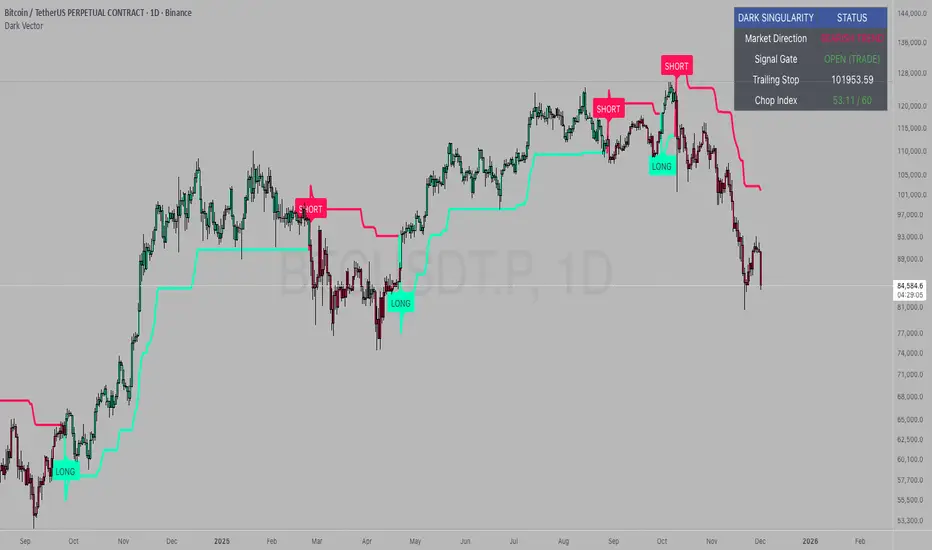
RSI adaptive zones [AdaptiveRSI]This script introduces a unified mathematical framework that auto-scales oversold/overbought and support/resistance zones for any period length. It also adds true RSI candles for spotting intrabar signals.
Built on the Logit RSI foundation, this indicator converts RSI into a statistically normalized space, allowing all RSI lengths to share the same mathematical footing.
What was once based on experience and observation is now grounded in math.
✦ ✦ ✦ ✦ ✦
💡 Example Use Cases
RSI(14): Classic overbought/oversold signals + divergence
Support in an uptrend using RSI(14)
Range breakouts using RSI(21)
Short-term pullbacks using RSI(5)
✦ ✦ ✦ ✦ ✦
THE PAST: RSI Interpretation Required Multiple Rulebooks
Over decades, RSI practitioners discovered that RSI behaves differently depending on trend and lookback length:
• In uptrends, RSI tends to hold higher support zones (40–50)
• In downtrends, RSI tends to resist below 50–60
• Short RSIs (e.g., RSI(2)) require far more extreme threshold values
• Longer RSIs cluster near the center and rarely reach 70/30
These observations were correct — but lacked a unifying mathematical explanation.
✦ ✦ ✦ ✦ ✦
THE PRESENT: One Framework Handles RSI(2) to RSI(200)
Instead of using fixed thresholds (70/30, 90/10, etc.), this indicator maps RSI into a normalized statistical space using:
• The Logit transformation to remove 0–100 scale distortion
• A universal scaling based on 2/√(n−1) scaling factor to equalize distribution shapes
As a result, RSI values become directly comparable across all lookback periods.
✦ ✦ ✦ ✦ ✦
💡 How the Adaptive Zones Are Calculated
The adaptive framework defines RSI zones as statistical regimes derived from the Logit-transformed RSI .
Each boundary corresponds to a standard deviation (σ) threshold, scaled by 2/√(n−1), making RSI distributions comparable across periods.
This structure was inspired by Nassim Nicholas Taleb’s body–shoulders–tails regime model:
Body (±0.66σ) — consolidation / equilibrium
Shoulders (±1σ to ±2.14σ) — trending region
Tails (outside of ±2.14σ) — rare, high-volatility behavior
Transitions between these regimes are defined by the derivatives of the position (CDF) function :
• ±1σ → shift from consolidation to trend
• ±√3σ → shift from trend to exhaustion
Adaptive Zone Summary
Consolidation: −0.66σ to +0.66σ
Support/Resistance: ±0.66σ to ±1σ
Uptrend/Downtrend: ±1σ to ±√3σ
Overbought/Oversold: ±√3σ to ±2.14σ
Tails: outside of ±2.14σ
✦ ✦ ✦ ✦ ✦
📌 Inverse Transformation: From σ-Space Back to RSI
A final step is required to return these statistically normalized boundaries back into the familiar 0–100 RSI scale. Because the Logit transform maps RSI into an unbounded real-number domain, the inverse operation uses the hyperbolic tangent function to compress σ-space back into the bounded RSI range.
RSI(n) = 50 + 50 · tanh(z / √(n − 1))
The result is a smooth, mathematically consistent conversion where the same statistical thresholds maintain identical meaning across all RSI lengths, while still expressing themselves as intuitive RSI values traders already understand.
✦ ✦ ✦ ✦ ✦
Key Features
Mathematically derived adaptive zones for any RSI period
Support/resistance zone identification for trend-aligned reversals
Optional OHLC RSI bars/candles for intrabar zone interactions
Fully customizable zone visibility and colors
Statistically consistent interpretation across all markets and timeframes
Inputs
RSI Length — core parameter controlling zone scaling
RSI Display : Line / Bar / Candle visualization modes
✦ ✦ ✦ ✦ ✦
💡 How to Use
This indicator is a framework , not a binary signal generator.
Start by defining the question you want answered, e.g.:
• Where is the breakout?
• Is price overextended or still trending?
• Is the correction ending, or is trend reversing?
Then:
Choose the RSI length that matches your timeframe
Observe which adaptive zone price is interacting with
Interpret market behavior accordingly
Example: Long-Term Trend Assesment using RSI(200)
A trader may ask: "Is this a long term top?"
Unlikely, because RSI(200) holds above Resistance zone , therefore the trend remains strong.
✦ ✦ ✦ ✦ ✦
👉 Practical tip:
If you used to overlay weekly RSI(14) on a daily chart (getting a line that waits 5 sessions to recalculate), you can now read the same long-horizon state continuously : set RSI(70) on the daily chart (~14 weeks × 5 days/week = 70 days) and let the adaptive zones update every bar .
Note: It won’t be numerically identical to the weekly RSI due to lookback period used, but it tracks the same regime on a standardized scale with bar-by-bar updates.
✦ ✦ ✦ ✦ ✦
Note: This framework describes statistical structure, not prediction. Use as part of a complete trading approach. Past behavior does not guarantee future outcomes.
framework ≠ guaranteed signal
---
Attribution & License
This indicator incorporates:
• Logit transformation of RSI
• Variance scaling using 2/√(n−1)
• Zone placement derived from Taleb’s body–shoulders–tails regime model and CDF derivatives
• Inverse TANH(z) transform for mapping z-scores back into bounded RSI space
Released under CC BY-NC-SA 4.0 — free for non-commercial use with credit.
© AdaptiveRSI

Regime [CHE] Regime — Minimal HTF MACD histogram regime marker with a simple rising versus falling state.
Summary
Regime is a lightweight overlay that turns a higher-timeframe-style MACD histogram condition into a simple regime marker on your chart. It queries an imported core module to determine whether the histogram is rising and then paints a consistent marker color based on that boolean state. The output is intentionally minimal: no lines, no panels, no extra smoothing visuals, just a repeated marker that reflects the current regime. This makes it useful as a quick context filter for other signals rather than a standalone system.
Motivation: Why this design?
A common problem in discretionary and systematic workflows is clutter and over-interpretation. Many regime tools draw multiple plots, which can distract from price structure. This script reduces the regime idea to one stable question: is the MACD histogram rising under a given preset and smoothing length. The core logic is delegated to a shared module to keep the indicator thin and consistent across scripts that rely on the same definition.
What’s different vs. standard approaches?
Reference baseline: A standard MACD histogram plotted in a separate pane with manual interpretation.
Architecture differences:
Uses a shared library call for the regime decision, rather than re-implementing MACD logic locally.
Uses a single boolean output to drive marker color, rather than plotting histogram bars.
Uses fixed marker placement at the bottom of the chart for consistent visibility.
Practical effect:
You get a persistent “context layer” on price without dedicating a separate pane or reading histogram amplitude. The chart shows state, not magnitude.
How it works (technical)
1. The script imports `chervolino/CoreMACDHTF/2` and calls `core.is_hist_rising()` on each bar.
2. Inputs provide the source series, a preset string for MACD-style parameters, and a smoothing length used by the library function.
3. The library returns a boolean `rising` that represents whether the histogram is rising according to the library’s internal definition.
4. The script maps that boolean to a color: yellow when rising, blue otherwise.
5. A circle marker is plotted on every bar at the bottom of the chart, colored by the current regime state. Only the most recent five hundred bars are displayed to limit visual load.
Notes:
The exact internal calculation details of `core.is_hist_rising()` are not shown in this code. Any higher timeframe mechanics, security usage, or confirmation behavior are determined by the imported library. (Unknown)
Parameter Guide
Source — Selects the price series used by the library call — Default: close — Tips: Use close for consistency; alternate sources may shift regime changes.
Preset — Chooses parameter preset for the library’s MACD-style configuration — Default: 3,10,16 — Trade-offs: Faster presets tend to flip more often; slower presets tend to react later.
Smoothing Length — Controls smoothing used inside the library regime decision — Default: 21 — Bounds: minimum one — Trade-offs: Higher values typically reduce noise but can delay transitions. (Library behavior: Unknown)
Reading & Interpretation
Yellow markers indicate the library considers the histogram to be rising at that bar.
Blue markers indicate the library considers it not rising, which may include falling or flat conditions depending on the library definition. (Unknown)
Because markers repeat on every bar, focus on transitions from one color to the other as regime changes.
This tool is best read as context: it does not express strength, only direction of change as defined by the library.
Practical Workflows & Combinations
Trend following:
Use yellow as a condition to allow long-side entries and blue as a condition to allow short-side entries, then trigger entries with your primary setup such as structure breaks or pullback patterns. (Optional)
Exits and stops:
Consider tightening management after a color transition against your position direction, but do not treat a single flip as an exit signal without price-based confirmation. (Optional)
Multi-asset and multi-timeframe:
Keep `Source` consistent across assets.
Use the slower preset when instruments are noisy, and the faster preset when you need earlier context shifts. The best transferability depends on the imported library’s behavior. (Unknown)
Behavior, Constraints & Performance
Repaint and confirmation:
This script itself uses no forward-looking indexing and no explicit closed-bar gating. It evaluates on every bar update.
Any repaint or confirmation behavior may come from the imported library. If the library uses higher timeframe data, intrabar updates can change the state until the higher timeframe bar closes. (Unknown)
security and HTF:
Not visible here. The library name suggests HTF behavior, but the implementation is not shown. Treat this as potentially higher-timeframe-driven unless you confirm the library source. (Unknown)
Resources:
No loops, no arrays, no heavy objects. The plotting is one marker series with a five hundred bar display window.
Known limits:
This indicator does not convey histogram magnitude, divergence, or volatility context.
A binary regime can flip in choppy phases depending on preset and smoothing.
Sensible Defaults & Quick Tuning
Starting point:
Source: close
Preset: 3,10,16
Smoothing Length: 21
Tuning recipes:
Too many flips: choose the slower preset and increase smoothing length.
Too sluggish: choose the faster preset and reduce smoothing length.
Regime changes feel misaligned with your entries: keep the preset, switch the source back to close, and tune smoothing length in small steps.
What this indicator is—and isn’t
This is a minimal regime visualization and a context filter. It is not a complete trading system, not a risk model, and not a prediction engine. Use it together with price structure, execution rules, and position management. The regime definition depends on the imported library, so validate it against your market and timeframe before relying on it.
Disclaimer
The content provided, including all code and materials, is strictly for educational and informational purposes only. It is not intended as, and should not be interpreted as, financial advice, a recommendation to buy or sell any financial instrument, or an offer of any financial product or service. All strategies, tools, and examples discussed are provided for illustrative purposes to demonstrate coding techniques and the functionality of Pine Script within a trading context.
Any results from strategies or tools provided are hypothetical, and past performance is not indicative of future results. Trading and investing involve high risk, including the potential loss of principal, and may not be suitable for all individuals. Before making any trading decisions, please consult with a qualified financial professional to understand the risks involved.
By using this script, you acknowledge and agree that any trading decisions are made solely at your discretion and risk.
Do not use this indicator on Heikin-Ashi, Renko, Kagi, Point-and-Figure, or Range charts, as these chart types can produce unrealistic results for signal markers and alerts.
Best regards and happy trading
Chervolino
MACD HTF Hardcoded

RT-Main IndicatorThe RT-Main Indicator is the core indicator that started it all. Developed over more than 5 years, this all in one tool helps traders identify when market participants are buying and selling using multi-colored candles that update in real time. It also identifies key support and resistance levels with Rainbow Pivots and highlights unusual price movements with Whale Print arrows. At its core, the RT-Main Indicator tracks buying and selling with eight colors instead of two, because real world markets are complex and order flow should not be treated as purely binary(Red vs Green).
Introduction
The RT-Main Indicator is designed as a primary Rainbow Theory Tool. It uses color coded candles to show changes in strength, Rainbow Pivots to mark important support and resistance areas, and Whale Prints to flag abnormal buy and sell activity. The goal is to bring these components together into a single framework so traders can read trend, structure, and larger player behavior without stacking many separate indicators.
This tutorial will cover each aspect of the tool:
Colored Candles
Whales are stealth experts and their strength is their ability to not be detected as they move the market. Rainbow Theory illuminates them from the shadows with a spectrum of specifically coded colors to display their unique strengths/weaknesses. In practice, this means the RT-Main Indicator uses internal strength and exhaustion metrics to color candles so that shifts in buying and selling pressure are easier to see.
The base of the RT-Main Indicator is the colored candles it paints onto the chart. These colors automatically tune to the chart based on the timeframe the trader is currently using (1D, H12, H1, 15M, etc). Instead of painting charts with a single Bullish Color (Green) and a single Bearish Color (Red), Rainbow Theory breaks out and identifies these moves into four Bearish Colors (Red|Orange|Yellow|White) and four Bullish Colors (Green|Blue|Purple|Pink). Each color tells a different story of the trend and helps traders better understand the nature of the current trend.
Bullish Colors
#4 - Green Candles - Weakest bullish color, these trends can sustain for extended periods of time.
#3 - Blue Candles - Strong bullish color, a move is starting to develop and can sustain.
#2 - Purple Candles - Second strongest bullish color, Whales are committed to the move but cannot sustain this level of momentum for long durations and a top is near.
#1 - Pink Candles - Strongest bullish color, Whales are using every single ounce of energy they have to push price up, the trend cannot be sustained and its time to take profits.
Bearish Colors
#4 - Red Candles - Weakest bearish color, these trends can sustain for extended periods of time.
#3 - Orange Candles - Strong bearish color, a move is starting to develop and can sustain.
#2 - Yellow Candles - Second strongest bearish color, Whales are committed to the move but cannot sustain this level of momentum for long durations and a bottom is near.
#1 - White Candles - Strongest bearish color, Whales are using every single ounce of energy they have to push price down into all out capitulation, the trend cannot be sustained and its time to look for entries.
How To Enable Colored Candles
By default, the Indicator’s Candles are placed behind the default candles. To properly display them, you must bring them forward. To do this, click the settings icon on the indicator, click visual order and then click bring to front:
Example - Bringing all the colors together into a Bearish Trend that reverses into a Bullish Trend:
The color thresholds can be tuned using the following options:
Automatic Tuning On/Off - Enables or disables the automatic color tuning that adjusts for each timeframe.
Auto Tuning Gain (Inc/Dec) - Increases or decreases how aggressive the automatic tuning algorithm adjusts color tuning.
Manual Fine Tuning - Linear Color Shift - Manually controls the linear sensitivity for color candle thresholds. This can be visualized as a setting being adjusted up or down in a straight, linear fashion. Linear Color Shift
Manual Fine Tuning - Exponential Color Shift - Manually controls the exponential sensitivity for color candle thresholds. This can be visualized as a setting being adjusted in an exponential manner where each level moves in an exponential shift instead of all moving equally. Exponential Color Shift Dark Mode
Some traders prefer light colored backgrounds for their charting, which can make white candles difficult to see. The RT-Main Indicator includes a Dark Mode toggle so colors stay readable on both dark and light charts.
Dark Mode Candles On/Off - Forces the indicator to use the second color set stored in the Style tab in the RT-Main Indicator settings when using light backgrounds. The White/Black Candle can also have a custom color applied if the trader is not content with these two default options.
Custom Candle Colors
In addition to toggling between light and dark modes, each individual color used by the RT-Main Indicator can be edited in the Style tab. This allows traders to keep the same logic while adjusting the visual palette to match their own chart layout.
Rainbow Rotations
Rainbow Rotations are a feature traders use to catch reversals or reversions when a trend fully blows out. The algorithm triggers on the first weaker candle that closes after a Pink or White candle prints. The general idea of this event is to show peaks and valleys of an asset.
In a strong bearish move, White candles mark extreme selling. If a weaker Yellow candle appears after a White candle, that first weaker candle is where the rotation event triggers and a Rainbow Rotation marker is placed on the chart. In a strong bullish move, Pink candles mark extreme buying. The first weaker bullish candle after a Pink candle triggers the opposite side rotation marker.
Note that Rainbow Rotations can only be visible for a finite amount of candles. The Replay function in TradingView can be used to review previous triggers.
Rainbow Rotation settings are available near the top of the settings menu:
Rainbow Rotation Alerts On/Off - Toggles these signals on or off with one click.
Rainbow Rotation Symbol - Customizes the symbol that is plotted on the chart for Rainbow Rotations. Both text and emojis can be used instead of the default symbol.
Rainbow Rotation Alerts
Rainbow Rotations can also be automated with standard TradingView alerts. To set this up:
Click the Alert icon on the right side of the screen.
Change Condition to the RT-Main Indicator.
Change the second condition to one of the three options:
Bullish Alerts | Bearish Alerts | Bearish and Bullish Alerts
Set Trigger to Once Per Bar Close.
Once set up, this allows traders to be notified when the RT-Main Indicator detects an extreme bullish or bearish trend that is starting to reverse.
Automated Pivots
One of the RT-Main Indicator's most powerful functions is the automated support and resistance pivots. This logic uses two internal bots that are tuned to look for potential support and resistance order blocks.
The Resistance Pivot Bot prints lines that are painted with red dashes.
The Support Pivot Bot prints lines that are painted with green dashes.
Regardless of the color of the dashed pivot line, any trend that approaches a pivot should be respected. For example, a trend moving up towards a green support pivot should still treat that area as resistance if price is approaching from below.
As the algorithm continues to print additional pivots on the chart, traders can start identifying order blocks that are otherwise hidden in the price action. These order blocks are key support and resistance areas that trends will often interact with and respect. Multiple stacked pivots in the same region are a visual clue that such an order block has formed.
Pivots can be tuned with the following options:
Pivot On/Off - Quickly toggles all pivots on or off.
Pivot Style - Switches between different styles of marking pivots.
Pivot Sensitivity (Inc/Dec) - Tunes the sensitivity of the pivot algorithms. Adjusting this changes how many pivots are printed on the chart.
Pivot Line Drawing Length - Controls how long the indicator draws the pivot lines.
Resistance / Support Pivot Colors - Allows customization of pivot colors to match the rest of the chart.
Whale Prints
One of the most important parts of the RT-Main Indicator is tracking Whale Prints. This portion of the script looks for abnormal buys and sells that are more consistent with large players than typical flow. Under normal circumstances, whales try to avoid being visible when they buy or sell, but there are times where they are forced to come out of hiding and deliberately move the market.
The Whale Print logic is tuned to notify the trader when it detects that this type of unusual activity may be occurring.
Bearish Whale Prints are marked on the chart with a red triangle.
Bullish Whale Prints are marked on the chart with a green triangle.
Whale Print clusters are situations where multiple Whale Prints have been identified in the past 10 candles. While individual Whale Prints are useful, clusters of Whale Prints are particularly important because they often signal that a very large move is potentially being prepared/defended.
The Whale Print table is an active tracker that counts the number of bullish and bearish Whale Prints that have occurred in the past 10 candles. Whale Print settings can be tuned with:
Whale Print Clusters Table On/Off - Toggles the Whale Print table on or off with one click.
Whale Print Clusters Alerts On/Off - Toggles the Whale Print cluster symbol on or off.
Whale Print Cluster Symbol - Changes the symbol on the chart for Whale Clusters. Emojis and text can both be used instead of the default symbol.
Whale Print Cluster Bullish/Bearish Label Color - Customizes the color of the Whale Print cluster labels on the chart. Whale Print Cluster Alerts
Whale Print Cluster alerts can be automated with standard TradingView alerts. To set this up:
Click the Alert icon on the right side of the screen.
Change Condition to the RT-Main Indicator.
Change the second condition to one of the two options:
Bull Whale Cluster Alert | Bear Whale Cluster Alert
Set Trigger to Once Per Bar Close. Once set up, this allows traders to be notified when the RT-Main Indicator detects a Whale Print Cluster.
Bull/Bear Trend Step Line
The inflection point of the colored candles is controlled by the Bull/Bear Trend Step Line. This is the grey stepped line on the chart where the bullish and bearish colors meet. Candles above this line are marked by the four bullish candle colors.
Candles below this line are marked by the four bearish candle colors.
The Bull/Bear Trend Step Line can be tuned with:
Bull/Bear Line Offset - Controls a vertical threshold for the line.
Bull/Bear Line Smoothness - Controls the sensitivity and smoothness of the line so traders can fine tune it for their specific setups. Most traders do not adjust the Bull/Bear Step Line. The small group that does typically only use these settings for lower timeframe trading setups below 5 minute candles. If preferred, the line can be recolored or hidden from the Style tab of the RT-Main Indicator without changing how the core color logic works.
Important Note
The RT-Main Indicator is intended to provide additional context around trend strength, exhaustion, and key areas of support and resistance. It is not a standalone signal generator and should always be used together with your own analysis, testing, and risk management. Historical color patterns, pivots, and Whale Prints do not guarantee future results.
🐋 Tight lines and happy trading!
