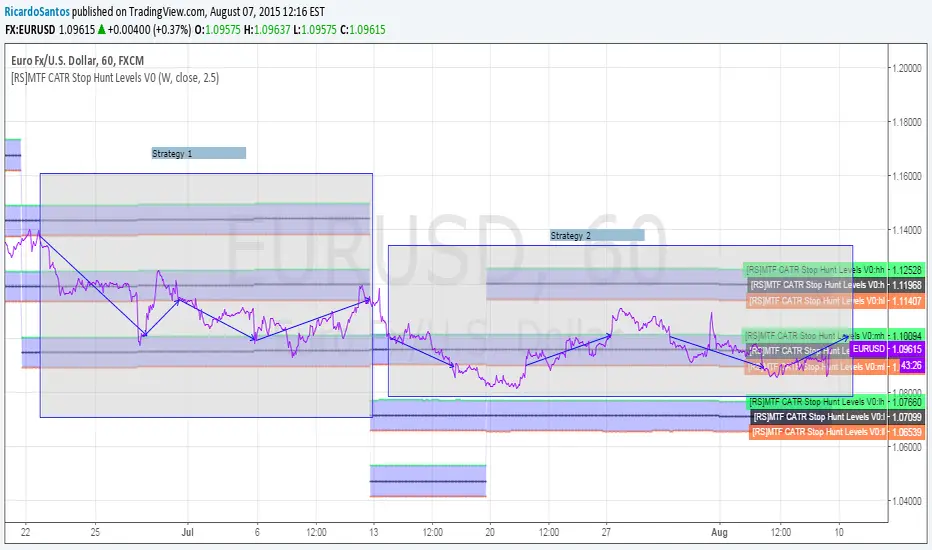
[RS]MTF CATR Stop Hunt Levels V0EXPERIMENTAL: Adaptation from stop hunt levels: Uses timeframe and atr to set ranges.אינדיקטור Pine Script®מאת RicardoSantos99922
Opening Range Breakout with 2 Profit Targets.Opening Range Breakout with 2 Profit Targets. Updated Indicator now works on all Symbols with Many Different Session Options. ***Known PineScript Issue…While the Opening Range is being Formed the lines only adjust for that individual bar. Just reset Indicator after Opening Range Completes. ***All Times are Based on New York Time Session Options Forex U.S. Banks Open (8:00), Gold U.S. Open (8:20), Oil U.S. Open (9:00), U.S. Cash Session - Stocks (9:30), NY Forex Open (17:00) , Europe Open (02:00), or if you choose Setting 0 the Session Runs from 00:00 to 00:00 (Midnight to Midnight). ***Ability to use 60 minute Opening Range, 30 minute, 15 minute, and many other options. ***However you can manually change the times in the Inputs Tab to adjust for any session you prefer. This is useful for Day Light Savings Adjustments. Also the default times work if your charts are set to EST Time. If you use A different time zone in your settings you need to Adjust the times in the inputs tab. Initially Opening Range High and Low plot as Yellow Lines. If Price Goes Above Opening Range then Line Turns Green. If Price Goes Below Opening Range Line Turns Red. By default the First Profit Target is 1/2 the Width of the Opening Range and the 2nd Profit Target is 1 Times the Opening Range. However these are Adjustable in the Inputs Tab. By Default the Opening Range Length is 1 Hour. However, you can Change the Opening Range Length to 15 min, 30 min, 2 hours etc. in the Inputs Tab. Plots a 1 Above or Below Candle when 1st Profit Target is Achieved, and a 2 when 2nd Profit Target is Achieved.אינדיקטור Pine Script®מאת ChrisMoody9292 9.5 K
Daily & Weekly Closing Range % (Screener Compatible)Overview This indicator calculates the Daily Closing Range (DCR) and Weekly Closing Range (WCR) as a percentage. It measures where the price finishes relative to the session's high and low. This is a staple metric for trend followers and "CANSLIM" style traders (popularized by platforms like Deepvue and MarketSmith) to identify institutional support. A high closing range (e.g., >80%) indicates that despite intraday volatility, buyers were aggressive enough to hold price near the highs. Key Features Screener Integration : Designed specifically to work with the TradingView Stock Screener (Beta). You can now filter your universe for stocks closing in the top 10% or 25% of their range. Clean Visuals : Includes a histogram at the bottom of your chart for quick visual confirmation of price "tightness." How to use for Screening: Add this script to your chart. Open the Stock Screener (Beta). Add a filter and search for "Closing Range Tracker". Select Daily Closing Range and set the value to Greater than 90 to find stocks finishing at the dead-highs.אינדיקטור Pine Script®מאת phonzietrade1
Daily & Weekly Closing Range % (Screener Compatible)Overview This indicator calculates the Daily Closing Range (DCR) and Weekly Closing Range (WCR) as a percentage. It measures where the price finishes relative to the session's high and low. This is a staple metric for trend followers and "CANSLIM" style traders (popularized by platforms like Deepvue and MarketSmith) to identify institutional support. A high closing range (e.g., >80%) indicates that despite intraday volatility, buyers were aggressive enough to hold price near the highs. Key Features Screener Integration: Designed specifically to work with the TradingView Stock Screener (Beta). You can now filter your universe for stocks closing in the top 10% or 25% of their range. Dual Timeframe: Pulls both Daily and Weekly data regardless of the timeframe you are currently viewing. Clean Visuals: Includes a histogram at the bottom of your chart for quick visual confirmation of price "tightness." How to use for Screening: Add this script to your chart. Open the Stock Screener (Beta). Add a filter and search for "Closing Range Tracker". Select Daily Closing Range and set the value to Greater than 90 to find stocks finishing at the dead-highs.אינדיקטור Pine Script®מאת phonzietrade1
NY 3Min Range Break 09H303 Min Range breakout NY Open High and Low range of Gold at 09H27-09H30. Break out to either side with full body candle closure. Enter with 1:1 RR Stop Loss on opposite side of the range.אינדיקטור Pine Script®מאת aubreyoxugnמעודכן 4
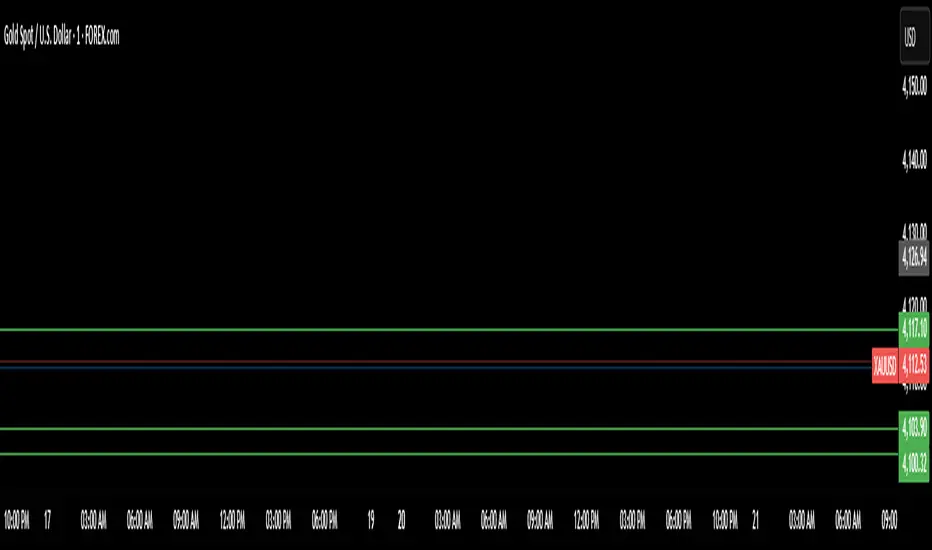
Asia Range + London Breakouts + NY RangeMeasures Asia date and price range, alerts when price breaks out high or low. Also measures NY date and price range. This is a personal script written by ChatGPT for my personal schedule and strategy.אינדיקטור Pine Script®מאת jacobenamii3
MudHome - HTF Last X Candles (Range + Live Price Label)This indicator provides a live Higher Timeframe (HTF) context overlay on lower-timeframe charts by displaying the most recent HTF candles as a compact inset, alongside a dynamically updating price range. It plots the last N HTF candles (up to 10), including the currently forming HTF candle, arranged left-to-right in standard chart order. This allows traders to visually track HTF structure, expansion, and volatility in real time while executing on lower timeframes. Key Features Displays the most recent HTF candles, including the live, still-forming candle Candles are drawn to the right of price, preserving chart clarity Automatically calculates and displays the HTF range high and low across the selected candles Range labels update dynamically as the current HTF candle expands Shows a live current-price label, updating tick-by-tick Clean, minimal presentation — no cluttered OHLC labels Fully configurable candle spacing, body width, colors, and offsets Smart Validation The indicator only renders when the selected timeframe is higher than the chart timeframe If not, a clear prompt is shown: “Select a higher time frame” Ideal Use Cases HTF bias and context on LTF execution charts Range expansion and contraction analysis ICT-style dealing range, premium/discount framing Session and structure awareness without switching timeframes This tool is designed to act as a live HTF context box, keeping higher-timeframe structure visible at all times while you focus on execution.אינדיקטור Pine Script®מאת greenturtle5635
Hedge Fund Session Ranges [GMT+2] - Multi-Timezone TrackingOverview This professional-grade tool is designed for institutional-style trading, specifically focusing on the Liquidity Cycles of the global markets. It allows traders to visualize key trading windows (Asia, Europe, and US) with precision, using a fixed GMT+2 offset—ideal for traders aligned with Middle Eastern or Eastern European timezones. Key Features Triple Session Tracking: Includes pre-defined windows for Asia, London Morning, and NY Afternoon. Dynamic Box Scaling: Automatically calculates and visualizes the High/Low range of each session in real-time. GMT+2 Optimization: Built-in timezone handling to ensure your charts align perfectly with local bank hours. Clean Visuals: Minimalist design to avoid chart clutter, allowing for clear price action analysis. Why Trade Sessions? Institutional volume isn't distributed evenly throughout the day. By identifying the Asian Range (01:00-06:00), the London Open (10:00-12:00), and the NY Reversal/Trend (16:30-18:30), traders can identify "Liquidity Grabs" and "Expansion Phases" more effectively.אינדיקטור Pine Script®מאת netha01414
Fibonacci Active Timeframe Range [UkutaLabs]█ OVERVIEW Fibonacci Active Timeframe Range is a precision intraday structure tool that uses real-time price expansion combined with Fibonacci ratios to map dynamic support and resistance levels directly from the active timeframe. Rather than relying on fixed historical averages, this indicator continuously builds a live range from current price action, projecting Fibonacci-derived levels that adapt to market conditions as they develop. The goal is to give traders a clear structural framework for: Intraday bias Reaction zones Volatility expansion Pullback levels Continuation targets —all in a clean, visual format that integrates seamlessly into any strategy or system. █ USAGE The indicator calculates the current timeframe range in real time, anchoring from the active session’s open and projecting multiple Fibonacci levels within that range. These levels act as dynamic support and resistance zones, updating as price evolves — allowing traders to: Identify high-probability reaction areas Define structure for entries and exits Frame risk more precisely Align trades with real-time volatility Anticipate expansion and contraction phases Each level is clearly labeled for instant recognition and can be used across scalping, intraday, and short-term swing strategies. █ SETTINGS Configuration • Show Labels – Toggle labels on/off for a clean or informational view • Display Mode – Control how much historical structure is visible • Font Size – Adjust label size for readability • Text Alignment – Align labels relative to each level • Fibonacci Levels – Enable/disable specific ratios • Range Mode – Select how the current timeframe range is calculatedאינדיקטור Pine Script®מאת UkutaLabsמעודכן 99584
Tokyo Sessions HighlighterOverview This indicator provides a clean, visual representation of the Asian (Tokyo) trading session by highlighting its specific price range. It is designed to help traders identify the initial intraday range and key liquidity levels established during the Tokyo open. Features Dynamic Range Box: Automatically plots a box from the session's highest high to its lowest low. Real-Time Updates: The box height and price labels update live as new session extremes are reached during the designated hours. Professional Aesthetic: Features a minimalist gray fill, solid black borders, and black text for a clean, professional look on both light and dark chart themes. Instant Data: Displays a label at the bottom of the box showing the exact price range in the format: Tokyo (Lowest Value - Highest Value). How To Use Settings: Adjust the Tokyo Session Time and Timezone in the indicator inputs to match your broker's server time or local requirements. Strategy: Use the highlighted range to identify potential breakouts or to treat the session high and low as institutional liquidity zones for the London and New York sessions. Customization: You can adjust the colors and transparency of the box through the script settings menu. אינדיקטור Pine Script®מאת cyber00tמעודכן 4
Open Range BreakoutOpen Range Breakout is a volatility harvesting tool designed to exploit directional expansion following major market opens. It isolates price action during initial liquidity injections to project institutional-grade zones that define a session's structural bias. Core Methodology The script uses a time-anchored engine to map critical supply and demand boundaries: Anchor Identification: The algorithm captures the absolute High and Low within a user-defined window at the start of Tokyo, London, or New York sessions. Structural Projection: It generates a Neutrality Box. A breach via candle close signals the transition from consolidation to expansion. Mathematical Risk Modeling: Upon breakout, it calculates a 3:1 Risk-Reward framework based on fixed percentage volatility. Session Dynamics The system is optimized for the global liquidity cycle: Session 1 (Asia): Maps early-day consolidation and range-bound liquidity. Session 2 (Europe): Captures the London Move to identify the trend. Session 3 (US): Analyzes high-volume New York opens for maximum momentum. Key Features Dynamic Price Mitigation: TP/SL zones stop extending the moment price touches the target or invalidation level to keep charts clean. Volatility-Adjusted Levels: Stop Loss parameters are normalized to price percentage for consistency across Indices, Forex, or Crypto. Minimalist Interface: Professional aesthetic with high-contrast visual cues for instant scannability. Use Cases Momentum Trading: Identifying the Origin of the Move post-open. Mean Reversion: Recognizing failed breakouts when price returns inside the range. Quantitative Backtesting: Benchmarking 3.0 RR targets across different session anchors.אינדיקטור Pine Script®מאת AlchimistOfCrypto35
HPDR Bands with projectionHPDR: Historical Price Delta Range What is it? The HPDR indicator measures how much an asset’s price typically changes over a specific timeframe. It looks at historical price movements ("deltas") and organizes them into percentiles. These are then plotted on your chart as a median line surrounded by statistical bands. This tool helps you understand an asset’s unique character and its typical price deviations. Because the median is in this context a statistically relative stable value(if you add 7 values to 1000 it doesn't change much), it allows for high-probability projections of the future median. For a clearer understanding of the indicator's logic, try setting the Range to 7 and the Offset to -7. The 50% percentile Band signifies that in 50% of all bars, the price remained within this statistical range.אינדיקטור Pine Script®מאת pepipo6
Session ATR Progression Tracker📊 Session ATR Progression Tracker - SIYL Regression Trading Tool Track how much of your instrument's 7-day Average True Range (ATR) has been covered during the current trading session. This indicator is specifically designed for regression traders who follow the "Stay In Your Lane" (SIYL) methodology, helping you identify when the probability of mean reversion significantly increases. If you are interested in more on that check out Rod Casselli and tradersdevgroup.com. 🎯 Key Features: • Real-time ATR Coverage Percentage - See at a glance what percentage of the 7-day ATR has been covered in the current session • SIYL-Optimized Thresholds - See at a glance when the instrument has achieved 80% and 100% ATR coverage, the proven thresholds where mean reversion probability increases (customizable) • Flexible Session Modes: - Daily: Resets at calendar day change - Session: Uses exchange-defined trading sessions - Custom Session: Set your exact session start/end times (perfect for futures traders and international markets) • Visual Alerts - Color-coded display (gray → orange → red) and optional background highlighting • Repositionable Display - Choose from 9 screen positions to avoid chart clutter • Session Markers - Green triangles mark the start of each new session • Detailed Stats - View current range, ATR value, session high/low, and session status 💡 Why Use This Indicator? This tool is built around a proven concept: regression trading becomes significantly more effective once a session has achieved at least 80% of its 7-day ATR. At this threshold, the probability of price reverting to mean increases substantially, creating higher-probability trade setups for SIYL practitioners. Benefits for regression traders: - Identify optimal entry points when mean reversion probability is highest (≥80% ATR coverage) - Avoid premature regression entries before adequate range has been established - Recognize when daily moves have "earned their range" and are ripe for reversal - Time fade-the-move and counter-trend strategies with statistical backing - Improve win rates by trading only after proven probability thresholds are met ⚙️ Setup Instructions: 1. Add the indicator to your chart 2. Select your preferred "Reset Mode" (recommend "Custom Session" for futures/international markets) 3. If using Custom Session, enter your session times in 24-hour format (e.g., 0930-1600 for US stocks, 1700-1600 for CME futures) 4. Adjust alert thresholds if desired (default: 80% and 100% - proven SIYL thresholds) 5. Position the display where it's most visible on your chart 📈 Works Across All Markets: Stocks • Futures • Forex • Indices • Crypto • Commodities Perfect for regression traders, mean reversion specialists, and SIYL practitioners who want to trade with probability on their side by entering only after the session has "earned its range." --- Tip: For futures contracts with overnight sessions that span calendar days (like MES, MNQ, MYM), use "Custom Session" mode with your exchange's official session times for accurate tracking. אינדיקטור Pine Script®מאת jmaybe1186
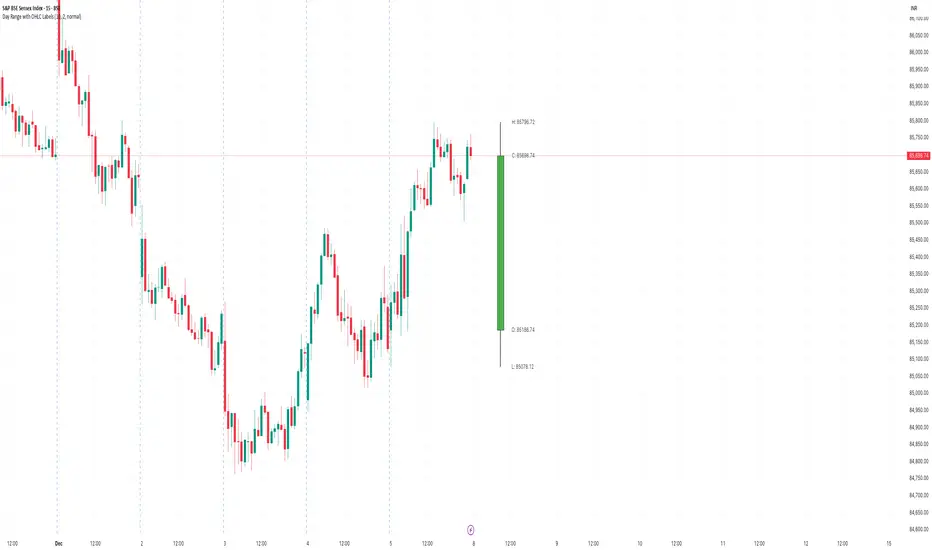
Day Range with OHLC LabelsThis indicator creates a synthetic daily candlestick that appears to the right of the chart, visually separated from real price bars. It helps traders quickly view each day’s High, Low, Open, and Close without zooming, scrolling, or switching to higher timeframes. What This Tool Does ✔ Draws a floating daily candle to the right of the current chart ✔ Displays the true Daily Open, High, Low, and Close ✔ Shows a center-aligned wick representing the full high-low range ✔ Shows a box-style candle body positioned using real OHLC values ✔ Labels the values (O, H, L, C) with large, clear fonts ✔ Automatically updates at each new day ✔ Works on any timeframe ✔ Helps intraday traders track daily structure visually Why This Indicator Is Useful This script is ideal for intraday traders who want instant awareness of the current day’s range. Instead of guessing or drawing manual lines, you get a clean daily candlestick rendered off to the right side, avoiding chart clutter. Great for: Range traders Breakout traders Liquidity zone analysis High/Low reference tracking Traders who prefer non-intrusive visuals Customization Adjustable offset: position the candle further right Configurable colors for wick + body Large-font labels for easy reading Automatically clears and redraws cleanly each day Summary This tool creates a clear, minimalistic, right-side daily candlestick complete with OHLC labels and centralized wick. It’s designed to improve chart clarity and support quick decision-making without blocking price candles.אינדיקטור Pine Script®מאת tradebro8522
Daily Range Zones: PDH/PDL with SL/TPThis indicator automatically plots the previous day's High and Low levels and projects dynamic Stop Loss (SL) and Take Profit (TP) zones based on the daily range percentage. It is designed for traders focusing on daily range breakouts or mean reversion strategies around the Previous Day High (PDH) and Previous Day Low (PDL). Key Features: Level 0 & 1: Visualizes the exact High and Low of the reference timeframe (Daily). Inner Zone (Orange): Calculated inside the range. Acts as a buffer for Stop Loss placement or entry zones for mean reversion. Outer Zone (Purple): Calculated outside the range (extension). Acts as a primary Take Profit target for breakout trades. Settings: Fully customizable percentages for inner and outer zones. Option to toggle between current day or previous day data. Works on any timeframe (intraday charts recommended).אינדיקטור Pine Script®מאת stoyan_valev40
Jace's Range DetectionAttempts to identify when an instrument is trading in a range. It uses Price Movement %, ATR and ADX. The following parameters are configurable: Range Detection Period, Range Threshold(%), ATR Period, ATR Range Multiplier.אינדיקטור Pine Script®מאת jacehoyleמעודכן 29
Time Range HighlighterThis indicator highlights up to two custom time ranges on your chart with fully adjustable settings: 🔧 Features: Define two separate time sessions Set custom start and end times (in any time zone) Choose unique highlight colors and opacity for each session Toggle each range on or off independently Timezone input allows syncing sessions to any global market hours (e.g., UTC, Asia/Tehran, New York) 🕒 Example Use Cases: Highlight market opening hours (e.g. NYSE: 0930–1600) Track your personal trading hours or peak volatility sessions Visualize specific algorithm time filters 📌 Usage: Enter your desired timezone string (e.g., "Asia/Tehran" or "Etc/UTC") Customize session times like "0930-1200" and "1500-1700" Adjust colors and visibility to fit your strategy Ideal for traders who rely on time-based setups or session overlays.אינדיקטור Pine Script®מאת Shayan_Bakhtiari118
ORB - Openning Range BreakoutORB - Opening Range Breakout (Indicator) This indicator visualizes the Opening Range Breakout (ORB) for the New York market session (9:30 AM – 4:00 PM NY), highlighting the High and Low of the first 5 minutes of the session. Key Features: Automatically calculates the High and Low of the 9:30 AM candle and updates if subsequent candles expand the range within the first 5 minutes. Plots invisible lines representing the High and Low of the opening range throughout the session. Fills the area between High and Low with a semi-transparent background, clearly showing the opening range zone. Works on any intraday timeframe and adapts automatically to the NY session. Perfect for breakout strategies, visually marking early support and resistance zones. How to Use: The shaded area between High and Low indicates the opening range. Traders can watch for breakouts above the High or breakdowns below the Low for potential entry signals. Can be combined with trend or volume indicators for confirmation. Notes: The session is automatically calculated using New York time. Background transparency can be adjusted to your preference.אינדיקטור Pine Script®מאת Mr_Wispמעודכן 32
Opening Range Gaps [TakingProphets]What is an Opening Range Gap (ORG)? In ICT, the Opening Range Gap is defined as the price difference between the previous session’s close (e.g., 4:00 PM EST in U.S. indices) and the current day’s open (9:30 AM EST). That gap is a liquidity void—an area where no trading occurred during regular hours. Why ICT Traders Care About ORG Liquidity Void (Gap Fill Logic) -Because the gap is an untraded area, it naturally acts as a draw on liquidity. -Price often seeks to rebalance by retracing into or fully filling this void. Premium/Discount Sensitivity -Once the ORG is defined, ICT treats it as a mini dealing range. -Above EQ (Consequent Encroachment) = algorithmic premium (sell-sensitive). -Below EQ = algorithmic discount (buy-sensitive). -Price reaction at these levels gives a precise read on institutional intent intraday. Support/Resistance from ORG -If the session opens above prior close, the gap often acts as support until violated. -If the session opens below prior close, the gap often acts as resistance until reclaimed. Key ICT Concepts Anchored to ORG Consequent Encroachment (CE): The midpoint of the gap. The algo is highly sensitive to CE as a decision point: reject → continuation; reclaim → reversal. Draw on Liquidity (DoL): Price is algorithmically “pulled” toward gap fills, CE, or the opposite side of the ORG. Order Flow Confirmation: If price ignores the gap and runs away from it, this signals strong institutional order flow in that direction. Confluence with Other Tools: FVGs, OBs, and HTF PD arrays often overlap with ORG levels, strengthening setups. Practical Application for Traders Bias Formation: Use ORG EQ as a line in the sand for intraday bias. If price trades below ORG EQ after the open → look for short setups into the prior day’s low or external liquidity. If price trades above ORG EQ → favor longs into highs/liquidity pools. Execution Framework: Wait for liquidity raids or market structure shifts at ORG edges (.00, .25, .50, .75). Target: EQ, opposite quarter, or full gap fill. Precision Reads: ORG lines let traders anticipate where algorithms are likely to respond, providing mechanical invalidation and clear targets without clutter.אינדיקטור Pine Script®מאת TakingProphets64
Open Range Breakout (ORB) with Alerts and LabelsThis is a classic 5min ORB indicator that highlights the orb range for your chosen session. This makes it easy to reference the range later in the trading day. In addition to the original orb signals for both buy and sell you can play off that zone for powerful entries later in the session. The signals give TP1 1:1 TP2 2:1 Options You can set the name of the session The color of the range. The buffer for the SL How many entries for the orbאינדיקטור Pine Script®מאת toksogunמעודכן 71
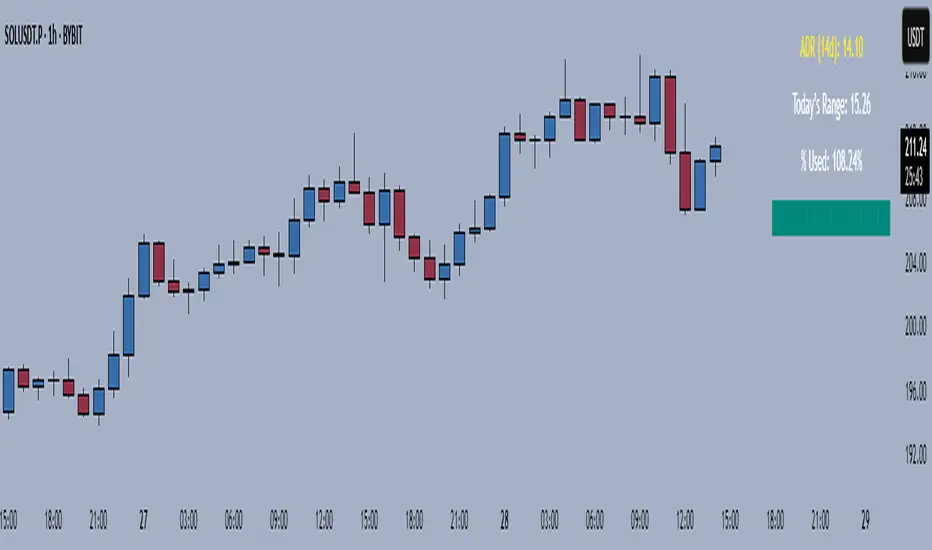
Average Daily Range TrackerAverage Daily Range Tracker This indicator helps you measure volatility in real time by tracking the Average Daily Range (ADR) and comparing it to the current day’s price action. 🔑 Features Calculates the ADR over a user-defined lookback period (default = 14 days). Displays today’s developing range (High–Low) as the session unfolds. Shows what % of the ADR has already been consumed intraday. Visual progress bar makes it easy to see how close today is to its historical average range. Optional ADR plot available in a separate pane. 📈 How traders use it Spot when a market has already made its “typical” daily move. Adjust intraday trade expectations: avoid chasing after the bulk of the move is done. Use % of ADR consumed as a volatility filter for setups. Combine with support/resistance to identify exhaustion zones. ⚙️ Customization Lookback length for ADR calculation. Progress bar size and color. Optional toggle to plot ADR in its own panel.אינדיקטור Pine Script®מאת nsm4מעודכן 1137
Renko Open Range delta Delta Renko-Style Indicator Guide (NQ Focus) This indicator takes inspiration from the Renko Chart concept and is optimized for the RTH session (New York time zone), specifically applied to the Nasdaq futures (NQ) product. If you’re unfamiliar with Renko charts, it may help to review their basics first, as this indicator borrows their clean, block-based perspective to simplify price interpretation. ⸻ 🔧 How the Indicator Works • At market open (9:30 AM EST), the indicator plots a horizontal open price line, referred to as 0 delta. • From this anchor, it plots 10 incremental levels (deltas) both above and below the open, each spaced by 62.5 NQ points. Why 62.5? • With NQ currently trading in the 23,000–24,000 range, a 62.5-point move represents roughly 0.26% of the daily average range. • This makes each delta step significant enough to capture movement while filtering out smaller noise. A mini table (location adjustable) displays: • Current delta zone • Last touched delta level This gives you a quick snapshot of where price sits relative to the open. ⸻ 📈 How to Read the Market • At the open, price typically oscillates between 0 and +1 / -1 delta. • A break beyond this zone often signals stronger directional intent: • Trending day: price can push into +2, +3, +4, +5 (or the inverse for downside). • Range day: expect price to bounce between +1, 0, -1 deltas. ⚠️ Note: This is a visualization tool, not a trading system. Its purpose is to help you quickly recognize range vs. trend conditions. ⸻ 📊 Example • In this case, NQ reached +1 delta shortly after open. • A retest of 0 delta followed, and price later surged to +5/+6 deltas (helped by Fed news). ⸻ 🛠️ Practical Uses This indicator can help you: • Define profit targets • Place hard stop levels • Gauge whether a counter-trend trade is worth the risk ⚠️ Caution: Avoid counter-trend trades if price is aggressively pushing toward +5/+6 or -5/-6 deltas, as trend exhaustion usually hasn’t set in yet. ⸻ 🔄 Adapting for ES (S&P Futures) • On NQ, 62.5 points ≈ $1,250 per contract. • For ES, this translates to 25 points. • Since 1 NQ contract ≈ 2 ES contracts in dollar terms, an optimized ES delta step would be 12.5 points. You may also experiment with different delta values (e.g., 50 or 31.25 for NQ) to align with your risk profile and trading style. ⸻ 🧪 Extending Beyond NQ You can experiment with applying this indicator to ES or even stocks, but non-futures assets may require additional calibration and testing. ⸻ ✅ Bottom line: This tool provides a clean, Renko-inspired framework for quickly gauging trend vs. range conditions, setting realistic profit targets, and avoiding poor counter-trend setups. אינדיקטור Pine Script®מאת DeLeBlanc68
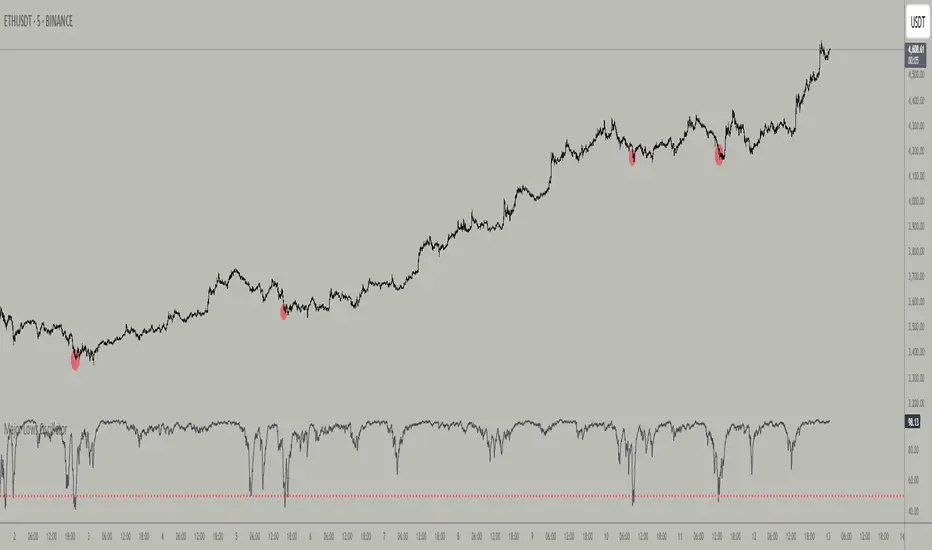
Major Lows OscillatorDescription The Major Lows Oscillator is a custom technical indicator designed to identify significant low-price areas by normalizing the current closing price relative to recent lowest lows and highest highs. The oscillator calculates a normalized price percentage over a configurable lookback period, applies exponential moving averages for smoothing, and inverts the result to highlight potential market bottoms. Calculation Details Lowest Low Lookback : Finds the lowest low over a user-defined period (default 100 bars). Highest High Lookback : Calculates the highest high over a short period (default 1 bar), providing a dynamic normalization range. Normalization : Normalizes the current close within the range defined by the lowest low and highest high, scaled to 0-100. Smoothing : Applies a 10-period EMA, inversion, and weighted smoothing combining the last valid value and current oscillator reading. Final Output : Applies a final EMA (period 1) and inverts the oscillator (100 - value) to emphasize major lows. Features Customizable midline level for signal alerts (default 50). Visual midline reference line. Alerts trigger on oscillator crossing below midline for automated monitoring. Usage Useful for complementing existing setups or integration in algorithmic trading strategies. Changing the input parameters opens new ways to leverage the asymmetric range concept, allowing adaptation to different market regimes and enhancing the oscillator’s sensitivity and utility. Examples of input combinations and their potential purposes include: Extremely Asymmetric Setting: Lowest Low Lookback = 200, Highest High Lookback = 1 Focuses on deep long-term lows contrasted with immediate highs, ideal for spotting strong oversold levels within an otherwise bullish short-term momentum. Symmetric Lookbacks: Lowest Low Lookback = Highest High Lookback = 50 Balances the range equally, creating a normalized oscillator that treats recent lows and highs with the same weight — useful for markets with balanced volatility. Short but Equal Lookbacks: Lowest Low Lookback = Highest High Lookback = 10 Highly sensitive to recent price swings, this setting can detect rapid shifts and is suited for intraday or very short-term trading. Inverted Extreme: Lowest Low Lookback = 1, Highest High Lookback = 100 Highlights very recent lows against a long-term high range, possibly signaling quick dips in a generally overextended market. Inputs Midline Level : Threshold for alerts (default 50). Lowest Low Lookback Period : Bars evaluated for lowest low (default 100). Highest High Lookback Period : Bars evaluated for highest high (default 1). Alerts Configured to trigger once per bar close when the oscillator crosses below the midline level. --- Disclaimer This indicator is for educational and analytical use only. אינדיקטור Pine Script®מאת BaidehnXBT33